在 Caché ObjectScript 中编写性能更佳的循环
最近,关于 Caché ObjectScript 中 for/while 循环性能的话题引发了讨论,我想与社区的其他成员分享一些想法和最佳实践。虽然这本身是一个基础话题,但人们很容易忽视那些看似合理的方法所带来的性能影响。 简而言之,使用$ListNext遍历$ListBuild列表,或使用$Order遍历局部数组,是速度最快的选项。
为了说明这一点,我们将以遍历逗号分隔字符串中的各个部分为例。
以最简洁的代码编写此类循环的一种自然方式是:
For i=1:1:$Length(string,",") {
	Set piece = $Piece(string,",",i)
	//Do something with piece...
}
这虽然直截了当,但许多编码风格指南可能会建议:
Set n = $Length(string,",")
For i=1:1:n {
	Set piece = $Piece(string,",",i)
	//Do something with piece...
}
实际上这两者之间并没有性能差异,因为结束条件并非在每次迭代中都会被评估。(我最初对此理解有误——感谢 Mark 指出这仅仅是风格问题,而非性能问题。)
对于带分隔符的字符串,我们可以获得更好的性能。随着字符串变长,$Piece(string,",",i) 的开销会越来越大:它必须遍历字符串直到第 i 个片段的末尾。通过使用 $ListBuild 列表可以改善这一点。 例如,使用$ListFromString、$ListLength 和$List:
Set list = $ListFromString(string,",")
Set n = $ListLength(list)
For i=1:1:n {
	Set piece = $List(list,i)
	//Do something with piece...
}
这通常比 $Length/$Piece 的性能更好,特别是在片段较长时。 在 $Length/$Piece 方法中,每次迭代都会扫描前 i 个片段中的字符。而在 $ListFromString/$ListLength/$List 方法中,每次迭代只需跟踪 $ListBuild 结构中的 i 个指针。 我们预计这种方法性能会更好,事实也确实如此,但执行时间仍然是 O(n²)。假设循环不会改变列表,我们可以通过使用 $ListNext 实现更好的性能——O(n):
Set list = $ListFromString(string,",")
Set pointer = 0
While $ListNext(list,pointer,piece) {
	//Do something with piece...
}
与 $List 每次都从列表开头开始遍历指针直至第 i个片段不同,变量“pointer”用于记录列表中的当前位置。 因此,总“跟随指针”操作的次数从 n(n+1)/2 次($List 的 n 次迭代中每次 i 次)减少到了仅 n 次($ListNext 的每次迭代中仅 1 次)。
最后,将字符串的片段转换为具有整数下标的数组可能是一个不错的选择;通常情况下,使用 $Order 遍历局部数组的速度可能会比 $ListNext 快一点到快得多(具体取决于列表元素的长度)。 当然,如果起始数据是一个带分隔符的字符串,将其转换为数组需要花费一些功夫。但如果你需要反复迭代、修改列表中的部分内容,或者需要反向迭代,那么这额外的工作通常是值得的。
以下是针对不同输入大小的执行时间示例(包括所有必要的转换):
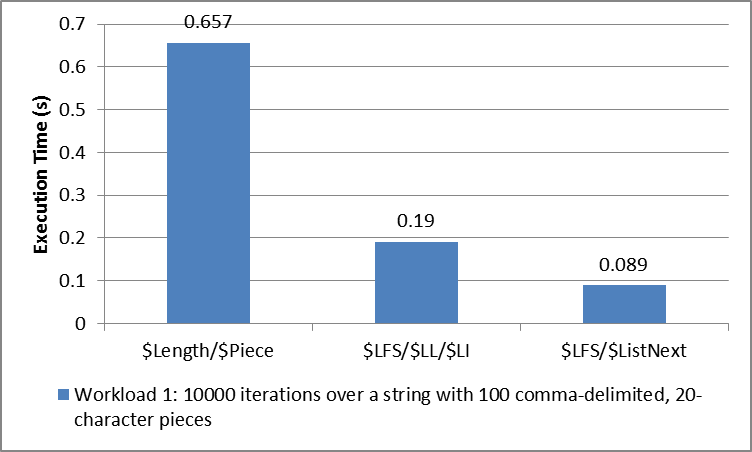
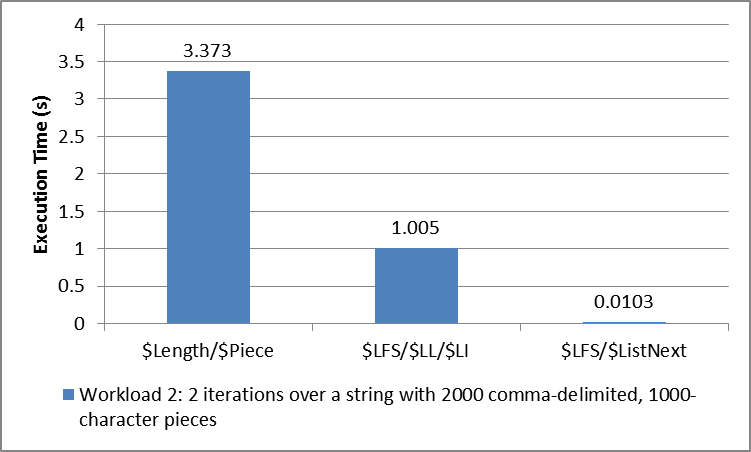
这些数据来源于:
USER>d ##class(DC.LoopPerformance).Run(10000,20,100)
Iterating 10000 times over all the pieces of a string with 100 ,-delimited pieces of length 20:
Using $Length/$Piece (hardcoded delimiter): .657383 seconds
Using $Length/$Piece: 1.083932 seconds
Using $ListFromString/$ListLength/$List (hardcoded delimiter): .189867 seconds
Using $ListFromString/$ListLength/$List: .189938 seconds
Using $ListFromString/$ListNext (hardcoded delimiter): .089618 seconds
Using $ListFromString/$ListNext: .089242 seconds
Using $Order over an equivalent local array with integer subscripts: .072485 seconds
****************************************************
Using $ListFromString/$ListNext (not including conversion to $ListBuild list): .058329 seconds
Using one-argument $Order over an equivalent local array with integer subscripts: .060327 seconds
Using three-argument $Order over an equivalent local array with integer subscripts: .069508 seconds

USER>d ##class(DC.LoopPerformance).Run(2,1000,2000)
Iterating 2 times over all the pieces of a string with 2000 ,-delimited pieces of length 1000:
Using $Length/$Piece (hardcoded delimiter): 3.372927 seconds
Using $Length/$Piece: 11.739316 seconds
Using $ListFromString/$ListLength/$List (hardcoded delimiter): 1.004757 seconds
Using $ListFromString/$ListLength/$List: .997821 seconds
Using $ListFromString/$ListNext (hardcoded delimiter): .010489 seconds
Using $ListFromString/$ListNext: .010268 seconds
Using $Order over an equivalent local array with integer subscripts: .000839 seconds
****************************************************
Using $ListFromString/$ListNext (not including conversion to $ListBuild list): .003053 seconds
Using one-argument $Order over an equivalent local array with integer subscripts: .000938 seconds
Using three-argument $Order over an equivalent local array with integer subscripts: .000677 seconds
在 Gist 上查看代码(DC.LoopPerformance)
更新:
讨论中还涌现出其他几种性能良好的变体,值得相互比较。请参阅 RunLinearOnly 方法以及更新后的 Gist中测试的不同实现。
USER>d ##class(DC.LoopPerformance).RunLinearOnly(100000,20,100)
Iterating 100000 times over all the pieces of a string with 100 ,-delimited pieces of length 20:
Using $ListFromString/$ListNext (While): .781055 seconds
Using $ListFromString/$ListNext (For/Quit): .8438 seconds
Using $ListFromString/$ListNext (While, not including conversion to $ListBuild list): .37448 seconds
Using $Find/$Extract (Do...While): .675877 seconds
Using $Find/$Extract (For/Quit): .746064 seconds
Using one-argument $Order (For): .589697 seconds
Using one-argument $Order (While): .570996 seconds
Using three-argument $Order (For): .688088 seconds
Using three-argument $Order (While): .617205 seconds

USER>d ##class(DC.LoopPerformance).RunLinearOnly(200,2000,1000)
Iterating 200 times over all the pieces of a string with 1000 ,-delimited pieces of length 2000:
Using $ListFromString/$ListNext (While): .913844 seconds
Using $ListFromString/$ListNext (For/Quit): .925076 seconds
Using $ListFromString/$ListNext (While, not including conversion to $ListBuild list): .21842 seconds
Using $Find/$Extract (Do...While): .572115 seconds
Using $Find/$Extract (For/Quit): .610531 seconds
Using one-argument $Order (For): .044251 seconds
Using one-argument $Order (While): .04467 seconds
Using three-argument $Order (For): .043631 seconds
Using three-argument $Order (While): .042568 seconds
下图对比了这些方法的 While/Do...While 版本。特别值得注意的是,请观察 $ListFromString/$ListNext 与 $Extract/$Find 的相对性能,以及 $ListNext(不进行字符串到 $ListBuild 列表的转换)与 $Order 在具有整数下标的局部数组上的相对性能。
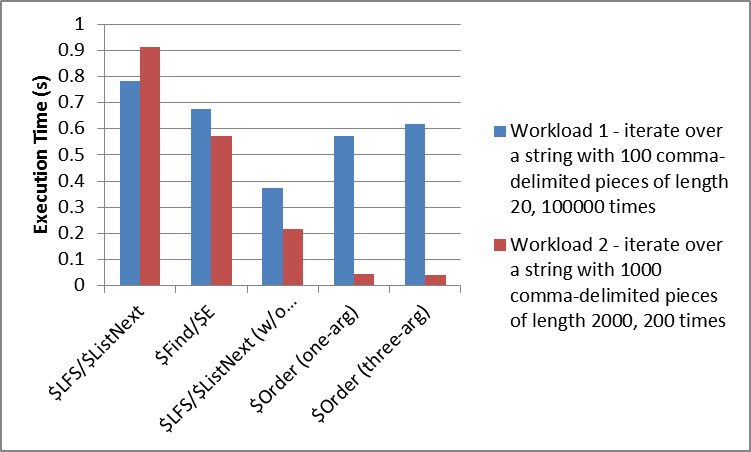
总结如下:
- 如果从带分隔符的字符串开始处理,$Find/$Extract 是性能最佳的选择,尽管其代码比 $ListFromString/$ListNext 稍显不直观。
- 在多种数据结构中进行选择时,对于小规模输入,遍历 $ListBuild 列表似乎比等效的本地数组略胜一筹;而对于大规模输入,本地数组的性能则显著更优。 我不确定为何性能差异会如此巨大。(与此相关,值得比较的是在 $ListBuild 列表与具有整数下标的局部数组中,随机插入和删除操作的开销;我怀疑set $list的速度会比在该数组中移动值快得多。)
- While 或 Do...While 循环的性能略优于等效的无参数 For 循环。