
发布新帖

查找

讨论
· 五月 5, 2022

Should the "Resource" for a local Database be stored centrally or with the DAT file?

I am sure I came across this in the past with Cache and just saw this again in IRIS.

When rebuilding or swapping a DAT file for a database it retains the Resource of the DAT file, not the Resource of the Database it is being used for.

For instance, if I have a local Database called APP with a resource %DB_APP and I want to refresh the data from another Database called TEST that has a Resource %DB_TEST I can just copy the DAT file from the TEST folder to the APP folder.

No Database settings are changed and it is all done with either IRIS down or the databases dismounted.

If you now look at the Database settings for the APP database it has the %DB_TEST resource not the %DB_APP it had before.

This is not necessarily a common occurrence and can obviously be handled but it something that can catch people out and not initially noticed.

What is peoples preference, should it keep the Resource for the Database settings or the DAT files?

For me, personally, I would prefer to keep the settings separate from the DAT file.

5 Comments
讨论 (5)0
登录或注册以继续
文章
· 四月 21, 2022 阅读大约需 2 分钟

Globals - Comparar Embedded Python e ObjectScript

Este exemplo demonstra a diferença de quando você acessa globais diretamente do
Embedded Python (ePy) comparado com o ObjectScript nativo (ISOS).

Para tornar este demo operacional, eu inicio 2 jobs em background, que irão escrever
sequencialmente na global dedicada. Um método de controle comum dispara uma execução síncrona.
De forma similar, outro método stop & view irá interromper o fluxo de dados.
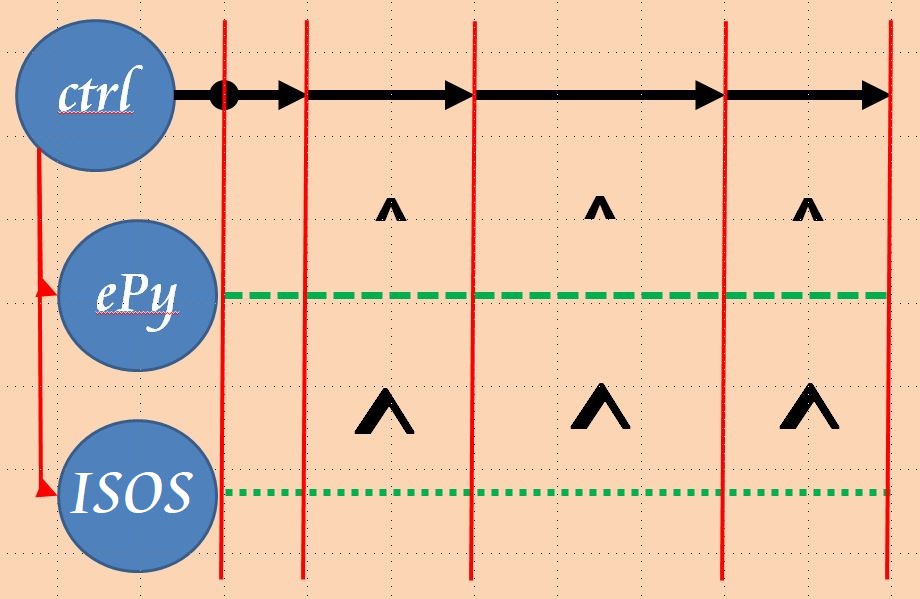
 

Os dois jobs executam em paralelo e a probabilidade de execução dos blocos sequencialmente é reduzida. Durante o desenvolvimento desta demo, eu detectei que o comando de JOB teve problemas com
ClassMethods escritos em Embedded Python (ePy).

AVISO:
Devido à Licença de Comunidade ser limitada em quantitativos de processador,
o início dos jobs em background pode falhar, especialmente se você possuir outras conexões
concorrentes.

Durante minha bateria de testes, eu descobri que o ePy obteve desempenho
~53% menor do que o código ISOS puro. 
Veja os exemplos abaixo.

O método de controle prepara processos em background e possui 3 comandos:

  • 0 .. para a execução dos jobs em background e apresenta os resultados mais recentes.
  • 1 .. interrompe os jobs em background e apresenta os resultados mais recentes
  • 2 .. executa a carga de dados nos jobs em background..
    • A carga de dados é interrompida após 60 segundos (caso não seja parado manualmente)
    • para evitar a "quebra" do Banco de Dados. 

Examplo

USER>do ##class(dc.rcc.ePYvsISOS).do()

JobStart ISOS #3841
JobStart  ePy #3842
Job Control [0=stop,1=view,2=go]: 2
Job Control [0=stop,1=view,2=go]: 1
^ePy(1,492029)=2022-03-11 20:49:32.851286
^ISOS(1,927383)=2022-03-11 20:49:32.851289

Job Control [0=stop,1=view,2=go]:
Job Control [0=stop,1=view,2=go]: 2
Job Control [0=stop,1=view,2=go]:
^ePy(2,4149270)=2022-03-11 20:50:54.620362
^ISOS(2,7719690)=2022-03-11 20:50:54.620371

Job Control [0=stop,1=view,2=go]:2
Job Control [0=stop,1=view,2=go]:
Job Control [0=stop,1=view,2=go]: 0
^ePy(3,3148765)=2022-03-11 20:50:54.620362
^ISOS(3,6714519)=2022-03-11 20:50:54.620371


Un agradecimiento especial a @Yuri Marx  por ayudarme.

English version

讨论 (0)2
登录或注册以继续
讨论 (0)0
登录或注册以继续
问题
· 四月 4, 2022

FTPS TLS session resumption

We are attempting to update some old FTP interfaces to use FTPS and having an issue with an outbound operation to a FileZilla server.

The connection to the the server works, however it fails to transfer files with the error "TLS session of data connection not resumed."

It appears that "TLS session resumption" is no longer optional in FileZilla Server, and I cannot find any details in the IRIS documentation about it.

Does IRIS support TLS session resumption, or know how to set up FTPS to a recent install of FileZilla Server?

4 Comments
讨论 (4)1
登录或注册以继续
文章
· 三月 29, 2022 阅读大约需 1 分钟

プログラムでCSVファイルを1行ずつ読み込む方法

これは、InterSystems FAQサイトの記事です。
 

%SQL.Util.Proceduresクラスの CSV() プロシジャを使用することにより、実現できます。
下記が使用例のコードとなります。(test.csvというファイルが c:\temp にあるという前提)

 Set rowtype="Name VARCHAR(50),UID VARCHAR(50), PHONE VARCHAR(50)"
 Set filename="c:\temp\test.csv"
 Set result=##class(%SQL.Statement).%ExecDirect(,"call %SQL_Util.CSV(,?,?)",.rowtype,filename)
 Set rset =result.%NextResult()
 
 // 全件表示したい場合は、do rset.%Display()
 While rset.%Next() {
     Write "Name:",rset.%GetData(1)," UID:",rset.%GetData(2)," PHONE:",rset.%GetData(3),!
     }

 Set rset="",result=""
 Quit


上記を実行することにより結果セットとして各行およびフィールドにアクセスできます。
実行例:

USER>do ^CSV
Name    UID     PHONE
山田,太郎 0001    080-1111-1111
bbb     0003    090-2222-2222
ccc     0009    "050-3333-3333"
ddd     0010    0120-17-1972
4 Rows(s) Affected


 %SQL.Util.Proceduresクラスのクラスリファレンスも併せてご確認ください。
クラスリファレンス:%SQL.Util.Procedures.CSV()

3 Comments
讨论 (3)1
登录或注册以继续