我以前可能提到过这一点:我认为可视化跟踪(Visual Traces),即包含每个步骤完整内容的序列图,是 IRIS 数据平台的一项神奇功能!以可视化跟踪的方式提供有关 API 内部工作原理的详细信息,对 IRIS 平台上的项目非常有用。当然,这适用于我们没有开发高负荷解决方案的情况,在这种情况下,我们根本没有时间保存/读取信息。对于所有其他情况,欢迎阅读本教程!
我将采用 "规范先行 "的方法,因此第一步将是创建规范。我让 Codex 创建了一个 OpenAPI 规范示例,得到了以下 JSON:
{
  "swagger": "2.0",
  "info": {
    "version": "1.0.0",
    "title": "Sample Spec API",
    "description": "Example Swagger 2.0 specification"
  },
  "basePath": "/sample-api",
  "schemes": [
    "http"
  ],
  "consumes": [
    "application/json"
  ],
  "produces": [
    "application/json"
  ],
  "paths": {
    "/sample/echo": {
      "post": {
        "summary": "Accepts JSON payload and returns another JSON payload",
        "operationId": "postSampleEcho",
        "parameters": [
          {
            "in": "body",
            "name": "body",
            "required": true,
            "schema": {
              "$ref": "#/definitions/SampleRequest"
            }
          }
        ],
        "responses": {
          "200": {
            "description": "Successful response",
            "schema": {
              "$ref": "#/definitions/SampleResponse"
            }
          }
        }
      }
    }
  },
  "definitions": {
    "SampleRequest": {
      "type": "object",
      "required": [
        "name",
        "count"
      ],
      "properties": {
        "name": {
          "type": "string",
          "example": "test"
        },
        "count": {
          "type": "integer",
          "format": "int32",
          "example": 1
        }
      }
    },
    "SampleResponse": {
      "type": "object",
      "properties": {
        "status": {
          "type": "string",
          "example": "ok"
        },
        "message": {
          "type": "string",
          "example": "Request processed successfully"
        }
      }
    }
  }
}接下来是创建缓存类:spec、disp 和 impl。我将为此使用 IRIS 系统 API。让我们在 Postman(或 CURL)中运行以下请求,并将生成的文件导出到项目中:
curl --location 'http://localhost:52773/api/mgmnt/v2/dev/Sample.REST.API?IRISUsername=_system&IRISPassword=SYS' \
--header 'Content-Type: application/json' \
--data '/// your spec here ///'
其中:
dev- 我的命名空间Sample.REST.API- API 类包
之后,我们将需要一个业务服务。我建议创建一个通用的基础服务,并在此基础上扩展我们的特定服务。这对于为我们未来的每个 API 提供进入互操作性产品的单独入口是必要的。以下是该基础服务的完整代码:
Class Sample.REST.Service.Core Extends (Ens.BusinessService, %REST.Impl)
{

/// Call this method from your .impl class</br>
/// pTarget - the Business Process that processes the message</br>
/// pPayload - the body of the HTTP request
ClassMethod OnMessage(pTarget As %String, pPayload As %DynamicObject) As %DynamicObject
{
    Do ..%SetContentType("application/json")

    Set input = ##class(Ens.StreamContainer).%New()
    Set input.Stream = ##class(%Stream.GlobalCharacter).%New()
    Do input.Attributes.SetAt(pTarget, "Target")

    Do pPayload.%ToJSON(input.Stream)

    Return:$CLASSNAME()'=$GET($$$ConfigClassName($CLASSNAME())) ..Error($$$ERROR($$$EnsErrBusinessDispatchNameNotRegistered, $CLASSNAME()))

	Set tSC = ##class(Ens.Director).CreateBusinessService($CLASSNAME(), .service)
	Return:$$$ISERR(tSC) ..Error(tSC)

	Set tSC = service.ProcessInput(input, .output)
	Return:$$$ISERR(tSC) ..Error(tSC)

    Return ..Success(output)
}

ClassMethod Error(pStatus As %Status) As %DynamicObject
{
    Do ..%SetStatusCode(##class(%CSP.REST).#HTTP500INTERNALSERVERERROR)
    Do ##class(%CSP.REST).StatusToJSON(pStatus, .json)
    Return json
}

ClassMethod Success(pOutput As Ens.StreamContainer) As %DynamicObject
{
    Do ..%SetStatusCode(##class(%CSP.REST).#HTTP200OK)

    If $iso(pOutput) {
        // HTTP status can be set during the processing of the call in the Business Process
        Do:pOutput.Attributes.GetAt("Status")'="" ..%SetStatusCode(pOutput.Attributes.GetAt("Status"))
        Set stream = pOutput.StreamGet()
		Return:$iso(stream)&&(stream.Size>0) {}.%FromJSON(stream)
	}

    Return ""
}

Method OnProcessInput(pInput As Ens.StreamContainer, Output pOutput As Ens.StreamContainer) As %Status
{
    Return ..SendRequestSync(pInput.Attributes.GetAt("Target"), pInput, .pOutput)
}
}
一些实现细节。我使用 Ens.StreamContainer 在业务服务和业务流程之间传递 JSON。OnMessage() 方法:
- 从
impl类调用 - 接收作为
%DynamicObject的 HTTP 请求体 - 创建业务服务实例
- 通过
OnProcessInput()将消息从服务发送到处理程序业务流程(请参阅pTarget参数)。 - 并将从业务流程收到的
%DynamicObject作为 HTTP 响应返回
接下来,让我们为消息创建一个简单的处理程序:
Class Sample.REST.Process.Echo Extends Ens.BusinessProcess
{

Method OnRequest(pRequest As Ens.StreamContainer, Output pResponse As Ens.StreamContainer) As %Status
{
    Set jsonIn = {}.%FromJSON(pRequest.StreamGet())
    Set jsonOut = {"status": "ok", "message": ($$$FormatText("Request processed for %1 with count %2", jsonIn.name, jsonIn.count))}

    Set pResponse = ##class(Ens.StreamContainer).%New()
    Set pResponse.Stream = ##class(%Stream.GlobalCharacter).%New()
    Do jsonOut.%ToJSON(pResponse.Stream)

    Return $$$OK
}
}
最后一个缓存类是 Sample.REST.Service.Core 的子类:
Class Sample.REST.Service.API Extends Sample.REST.Service.Core
{

ClassMethod OnGetConnections(Output pArray As %String, pItem As Ens.Config.Item)
{
	Set pArray(##class(Sample.REST.Process.Echo).%ClassName(1)) = ""
}
}
在这里,您只需覆盖 OnGetConnections() 以描述与生产中业务流程的连接。这不会影响功能,但对于在生产用户界面中建立正确的链接是必要的。
⚠️ 这里最重要的是:必须为生产中的业务主机使用类名。这对我们的示例能否正常运行至关重要,而且我认为这是一个好的做法。
现在,我们可以为 impl 类添加实现:
ClassMethod postSampleEcho(body As %DynamicObject) As %DynamicObject
{
    Return ##class(Sample.REST.Service.API).OnMessage(##class(Sample.REST.Process.Echo).%ClassName(1), body)
}
编码部分已经完成。接下来,我们需要添加一个名为 /sample-api 的 Web 应用程序(与规范中的 basePath 相同),将 Sample.REST.API.disp 类设置为派发类,并在生产中创建以下业务主机:
Sample.REST.Service.APISample.REST.Process.Echo
我们应该得到生产系统的外观:
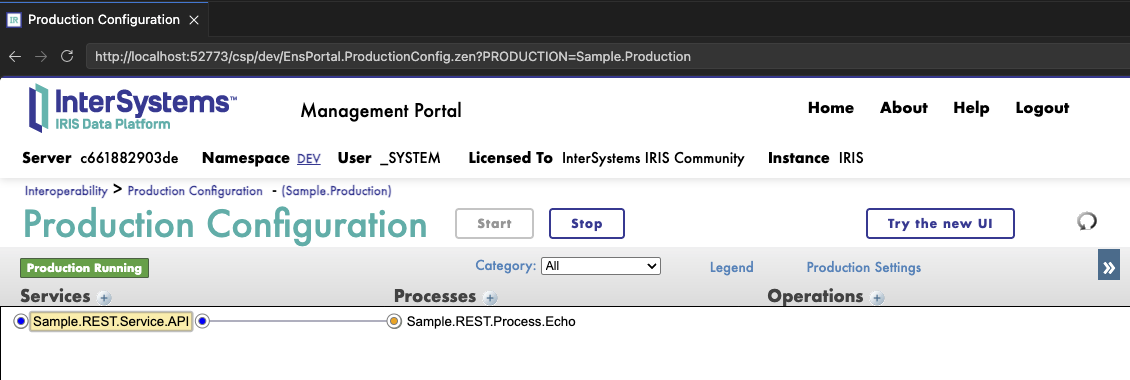
让我们尝试执行请求:
curl --location 'http://localhost:52773/sample-api/sample/echo' \
--header 'Content-Type: application/json' \
--data '{
  "name": "test",
  "count": 1
}'
我们将得到响应:
{
    "status": "ok",
    "message": "Request processed for test with count 1"
}
此外,在 Sample.REST.Service.API 服务消息中,我们还将获得一个可视化跟踪,详细说明我们的调用。
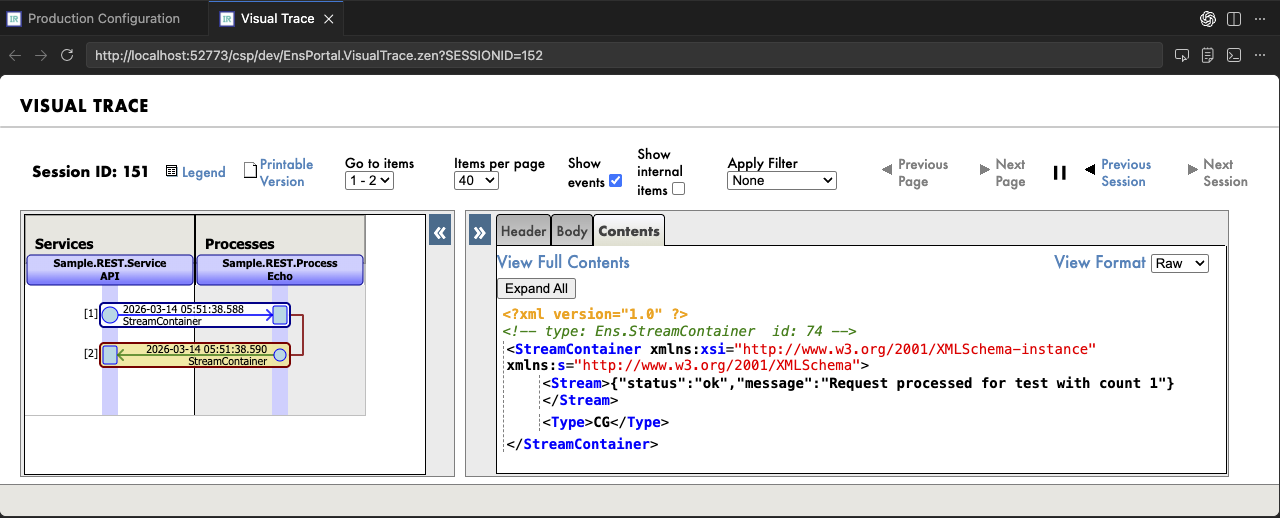
以上就是我今天要向大家介绍的关于互操作性产品中 REST API 的全部内容。我建议大家使用iris-web-swagger-ui以方便的形式向外部团队提供 OpenAPI 规范。并使用内置的JWT 身份验证来保证安全性。我相信这就是 IRIS 数据平台上和谐的 API 的样子。
欢迎提出任何问题。