
发布新帖

查找

文章
· 十一月 21, 2020 阅读大约需 3 分钟

ObjectScript over ODBC

Every now and then you may encounter a situation where for various reasons
ODBC is the only option to access a remote system. Which is sufficient as long as you need to examine or change tables.
But you can't directly execute some commands or change some Global.

Special thanks @Anna Golitsyna for inspiring me to publish this.


This examples provides 3 Methods projected as SQLprocedure that enable this if other ways of access are blocked.
Typically by some firewall.

  • SQLprocedure Ping() returns Server::Namespace::$ZV and allows to check the connection
  • SQLprocedure Xcmd(<commandline>,<resultvar>)  executes the command line you submit and returns the result that you deposit in a variable that you named.
  • SQLprocedure Gset(<global>,<subscript>,<value>,<$data>)  allows you to set or delete a global node <global>  is a GlobalName in the remote namespace including leading carret; e.g. '^MyGlobal' (sql quoted!) <subscript> stands for the complete subscript including parenthesis ;e.g. '(1,3,"something",3)'  (sql quoted!) <$data> controls if you set the Global Node or execute a ZKILL on it; e.g. 1, 11 to set, 0,10 to ZKILL         As you may guess by the name this is especially useful during a Global copy. 

The procedure Gset is designed to make use of Global Scanning described earlier.
Combined, they allow a Global copy across any ODBC connection.  

Installation: 

- On the remote system you need the class provided with this article in OpenExchange
- On the local (source) system you need to define the procedures as Linked SQL Procedures
      SMP>System>SQL> Wizards>Link Procedure
      at that time you local package name is defined    (in the examples I used zrccEX)
-  If you want to run the Global copy you also need to install the Global  Scanning class from OEX

   (It is just for comfort)

Examples:

USER>do $system.SQL.Shell()
SQL Command Line Shell
[SQL]USER>>select rccEX.Ping()
Expression_1
cemper9::CACHE::IRIS for Windows (x86-64) 2020.1 (Build 215U) Mon Mar 30 2020 20:14:33 EDT

Check existence of Global ^rcc

[SQL]USER>>select rccEX.Xcmd('set %y=$d(^rcc)','%y')
ok: 10

Set some value to ^rcc4(1,"demo",3,4)

[SQL]USER>>select rccEX.Gset('^rcc4','(1,"demo",3,4)','this is a demo',1)
Expression_1
ok: ^rcc4(1,"demo",3,4)

Do a global copy from ^rcc2 to ^rcc4.
First show ^rcc2

USER>>select reference,value,"$DATA" from rcc_G.Scan where rcc_G.scan('^rcc2',4)=1
Reference       Value   $Data
 ^rcc2                  10
(1)             1       1
(2)             2       11
(2,"xx")                10
(2,"xx",1)      "XX1"   1
(2,"xx",10)     "XX10"  1
(2,"xx",4)      "XX4"   1
(2,"xx",7)      "XX7"   1
(3)             3       1
(4)             4       11
(4,"xx")                10
(4,"xx",1)      "XX1"   1
(4,"xx",10)     "XX10"  1
(4,"xx",4)      "XX4"   1
(4,"xx",7)      "XX7"   1
(5)             5       1
16 Rows(s) Affected

Now run the copy to remote global

[SQL]USER>>select rccEX.Gset('^rcc4',reference,value,"$DATA")  from rcc_G.Scan where rcc_G.scan('^rcc2',4)=1
Expression_1
ok: ^rcc4
ok: ^rcc4(1)
ok: ^rcc4(2)
ok: ^rcc4(2,"xx")
ok: ^rcc4(2,"xx",1)
ok: ^rcc4(2,"xx",10)
ok: ^rcc4(2,"xx",4)
ok: ^rcc4(2,"xx",7)
ok: ^rcc4(3)
ok: ^rcc4(4)
ok: ^rcc4(4,"xx")
ok: ^rcc4(4,"xx",1)
ok: ^rcc4(4,"xx",10)
ok: ^rcc4(4,"xx",4)
ok: ^rcc4(4,"xx",7)
ok: ^rcc4(5)
 16 Rows(s) Affected
讨论 (0)1
登录或注册以继续
文章
· 十一月 20, 2020 阅读大约需 3 分钟

InterSystems 製品を初めて使用する方向け学習コンテンツなど

これはInterSystems FAQ サイトの記事です。

(2025/2/17更新)担当される役割や学習目的に合わせた最適なラーニングパス(学習経路)を確認できるページ :InterSystems ラーニングパス をご利用ください(ページの使い方については、記事「学習目的に合わせた最適なラーニングパス(学習経路)を確認できるページ」をご参照ください)。

また、現在ご覧いただいている開発者コミュニティの中では、初心者(beginner)タグ があり、下記セルフラーニング用資料/ビデオをご用意しています。ぜひご参照ください。

セルフラーニングビデオ以外にも、過去に開催したウェビナーアーカイブビデオも公開しています👉「開発者向けウェビナー:アーカイブビデオ一覧

ぜひご参照ください。


この他、Developer Hubに特別な準備なしに開始できるチュートリアルを4種類ご用意しています。

チュートリアルで試せる内容については「InterSystems Developer Hub:クリック1回で開始できるチュートリアル(4種)のご紹介」をご覧ください。

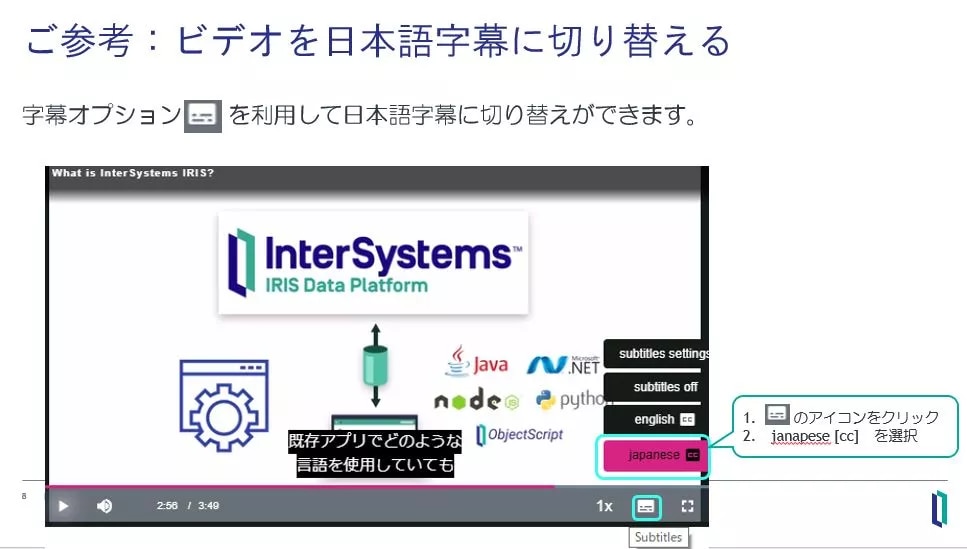
また 5分で試せる QuickStarts では、サンプルコードの実行方法などを解説しています。ビデオは日本語字幕付きに切り替えができます。

日本語字幕への切り替えは以下のように行います。


IRIS または IRIS for Health はコンテナ版も用意があり InterSystems コンテナレジストリより自由に pull できます。

InterSystems コンテナレジストリの使い方やコンテナ開始までの流れは、「InterSystemsコンテナレジストリの使い方とコンテナ開始までの流れ(解説ビデオ付き)」をご参照ください。


この他、開発者コミュニティが開催している IRIS プログラミングコンテストでは、コンテナを利用した開発環境のテンプレートをご用意しています。使い方のイメージについては、こちらの記事のビデオ(8:26~)をご参照ください。

また、AWS、Azure、GCPのマーケットプレイスで IRIS または IRIS for Health の Community Edition をご利用いただけます。各クラウドでのご利用方法についてはこちらのビデオ(日本語字幕付き)をご参照ください(字幕の切り替えは上図をご参照ください)。

この他、オンラインラーニングクラスルームラーニング(*) もございます。
(*) 2020年4月より、ブラウザ経由でアクセスできる演習環境を利用した 対面形式 ではない ”オンライン” のクラスルームトレーニングを開催しています。


InterSystems 製品の使い方がちょっとわからない・・・というときは、ぜひ開発者コミュニティへご質問ください!

そして、良い解決方法をご存知の開発者のみなさま!ぜひ、回答にご協力ください!☺

讨论 (0)1
登录或注册以继续
问题
· 十一月 16, 2020

where to start to generate data quality report of hl7 msgs and report data issues back to facilities

we are getting number of msgs from multiple facilities into our HIE solution, now which facilities is sending bad quality data and put some process around it to improve the msg quality

so where to start to generate this report, any guidance would be appreciated. 

1 Comment
讨论 (1)1
登录或注册以继续
文章
· 十一月 15, 2020 阅读大约需 8 分钟

Create an IRIS Interoperability Production from Swagger

Hi Community,

OpenAPI-Client Gen has just released, this is an application to create an IRIS Interoperability Production client from Swagger 2.0 specification.

Instead of the existing tool ^%REST that creates a server-side REST application, OpenAPI-Client Gen creates a complete REST Interoperability Production client template.

Install by ZPM:

12 Comments
讨论 (12)3
登录或注册以继续
文章
· 十一月 13, 2020 阅读大约需 2 分钟

Interoperability管理データを削除(パージ)する方法

これは InterSystems FAQ サイトの記事です。
 

管理ポータルから行う手動のパージ(Purge)と、タスクを利用する方法があります。

データを手動でパージするには、[Interoperability] > [管理] > [管理データの削除] ページを使用します。
(このページではバックグラウンド・ジョブとしてパージを実行しますので、ページがタイムアウトしても問題ありません。)

タスクでパージする場合は、[システムオペレーション] > [タスクマネージャ] > [新しいタスク] の画面でInteroperabilityプロダクションのネームスペースを指定し、タスクタイプに「Ens.Util.Tasks.Purge」を指定します。

タスクの場合は、「TypesToPurge」の項目で以下のパージ対象タイプを選択できます(図参照)。

  • イベント・ログ (Events)
  • メッセージ (Messages)
  • ビジネス・プロセス・ログ (Business Processes)
  • ビジネス・ルール・ログ (Rule Logs)
  • I/O アーカイブ・ログ (I/O Logs)
  • モニター・カウンター (Host Monitor Data)
  • 管理対象アラート (Managed Alerts)  


詳細は、以下のドキュメントをご参照ください。

プロダクション・データのパージ【IRIS】


※注意

2022.1以降のバージョンでは、プロダクションの管理データを削除するためには、新しい特権 "%Ens_PurgeSchedule:USE" リソースが必要となりました。
このリソースは "%EnsRole_Administrator" ロールで付与されます。また、カスタムロールに追加することも可能です。  
詳細は、こちらのドキュメント をご覧ください。


enlightened【ご参考】
Ensembleでの孤立メッセージ

讨论 (0)0
登录或注册以继续