发布新帖

查找

文章
· 七月 24, 2019 阅读大约需 1 分钟

A new version of the yape (Yet Another pButtons Extractor) docker container has been uploaded to docker hub.

Available at:

https://hub.docker.com/r/yape/yape/

$ docker container run --rm -v "$(pwd)":/data yape/yape --version
yape 2.2.6

See the readme at:

https://github.com/murrayo/yape


Changes include:

  • Reinstate config file, make some more changes to smarter x and y axis.
  • Update line style choices in config file.
  • Solve for yyyy dates and yy dates or bail out. Make date string consistent for windows title (drop decimal places), add short day to title. 
  • Increase decimal precision for y axis less than 10, eg for windows sec/read is seconds not ms like linux
  • Some minor fixes after update python libraries.

Today, GitHub and the container are in synch.

讨论 (0)1
登录或注册以继续
文章
· 七月 12, 2019 阅读大约需 2 分钟

Basic Database Metrics example

This is a self contained class that can be run from the Intersystems Task Scheduler which records peak usage details for databases and licenses built up throughout the day and retaining 30 days history.

To schedule the task to run every hour:  

d ##class(Metrics.Task).Schedule()

You can also specify your own start time, stop time, and run interval:

d ##class(Metrics.Task).Schedule(startTime, stopTime, intervalMins)

Metrics are stored in ^Metrics in the namespace that the class resides in/is run from.

^Metrics("SystemMetrics","Databases",{database},+$h,"usage",{metric})={value}  
   "Available"     = lowest peak space available in the database (KB).  
   "Used"          = peak space used in the database (KB).  
   "Size"          = peak size of the database (KB).  
   "Free"          = lowest peak percentage free space of the database (%).  
   "MaxSize"       = peak maximum size paramater of the database (KB).  
   "DiskFreeSpace" = peak space available on the disk/volume for the database (KB).  
   "DiskSize"      = peak total size of the disk/volume for the database (KB).  
   "MaxFree"       = lowest peak percentage free space for the database based on MaxSize or DiskFreeSpace if not set (%).  
      
^Metrics("SystemMetrics","License",+$h,{metric})  
   "Customer"      = customer name on the license key.  
   "Expires"       = expiry date on the license key.  
   "Total"         = peak total units on the license key.  
   "Used"          = peak license units in use.  
   "Available"     = lowest peak license units available.

I am sure there are improvements to be made but hopefully a good starting point.

3 Comments
讨论 (3)1
登录或注册以继续
问题
· 六月 24, 2019

Create a Pass-through SOAP WebService

Hi all,

I'm triying to create a SOAP Pass-through acording to Configuring Pass-through Business Services instructions, but I'm not able to run it sad

I'm using the following WebService

http://www.dneonline.com/calculator.asmx?wsdl

I've created both items

CalculatorSOAPCSPServ
  • Classname: EnsLib.SOAP.GenericService 
  • Target Config Name: CalculatorSOAPCSPOp
  • Port: Empty
  • Enable Standard Request: Checked
  • Pool size: 0
CalculatorSOAPCSPOp


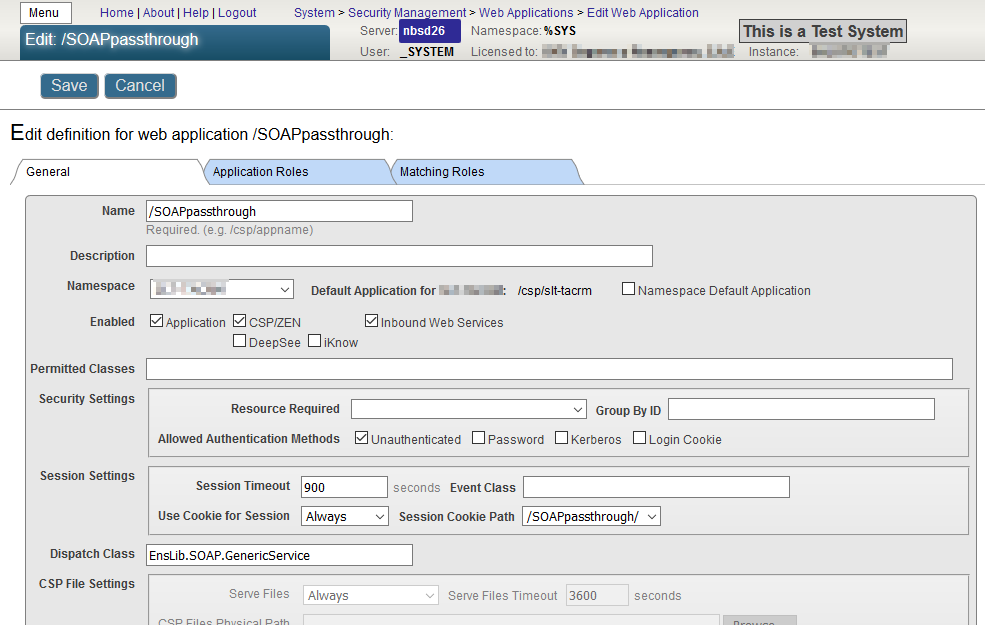
Also, I've created the Web Application using the following parameters:

Name: /SOAPpassthrough

Dispatch Class: EnsLib.SOAP.GenericServer


If I ask directly the WSDL to Calculator WebService it retrives this XML:

http://www.dneonline.com/calculator.asmx?wsdl

<?xml version="1.0" encoding="utf-8"?>
<wsdl:definitions xmlns:soap="http://schemas.xmlsoap.org/wsdl/soap/" xmlns:tm="http://microsoft.com/wsdl/mime/textMatching/" xmlns:soapenc="http://schemas.xmlsoap.org/soap/encoding/" xmlns:mime="http://schemas.xmlsoap.org/wsdl/mime/" xmlns:tns="http://tempuri.org/" xmlns:s="http://www.w3.org/2001/XMLSchema" xmlns:soap12="http://schemas.xmlsoap.org/wsdl/soap12/" xmlns:http="http://schemas.xmlsoap.org/wsdl/http/" targetNamespace="http://tempuri.org/" xmlns:wsdl="http://schemas.xmlsoap.org/wsdl/">
  <wsdl:types>
    <s:schema elementFormDefault="qualified" targetNamespace="http://tempuri.org/">
      <s:element name="Add">
        <s:complexType>
          <s:sequence>
            <s:element minOccurs="1" maxOccurs="1" name="intA" type="s:int" />
            <s:element minOccurs="1" maxOccurs="1" name="intB" type="s:int" />
          </s:sequence>
        </s:complexType>
      </s:element>
      <s:element name="AddResponse">
        <s:complexType>
          <s:sequence>
            <s:element minOccurs="1" maxOccurs="1" name="AddResult" type="s:int" />
          </s:sequence>
        </s:complexType>
      </s:element>
      <s:element name="Subtract">
        <s:complexType>
          <s:sequence>
            <s:element minOccurs="1" maxOccurs="1" name="intA" type="s:int" />
            <s:element minOccurs="1" maxOccurs="1" name="intB" type="s:int" />
          </s:sequence>
        </s:complexType>
      </s:element>
      <s:element name="SubtractResponse">
        <s:complexType>
          <s:sequence>
            <s:element minOccurs="1" maxOccurs="1" name="SubtractResult" type="s:int" />
          </s:sequence>
        </s:complexType>
      </s:element>
      <s:element name="Multiply">
        <s:complexType>
          <s:sequence>
            <s:element minOccurs="1" maxOccurs="1" name="intA" type="s:int" />
            <s:element minOccurs="1" maxOccurs="1" name="intB" type="s:int" />
          </s:sequence>
        </s:complexType>
      </s:element>
      <s:element name="MultiplyResponse">
        <s:complexType>
          <s:sequence>
            <s:element minOccurs="1" maxOccurs="1" name="MultiplyResult" type="s:int" />
          </s:sequence>
        </s:complexType>
      </s:element>
      <s:element name="Divide">
        <s:complexType>
          <s:sequence>
            <s:element minOccurs="1" maxOccurs="1" name="intA" type="s:int" />
            <s:element minOccurs="1" maxOccurs="1" name="intB" type="s:int" />
          </s:sequence>
        </s:complexType>
      </s:element>
      <s:element name="DivideResponse">
        <s:complexType>
          <s:sequence>
            <s:element minOccurs="1" maxOccurs="1" name="DivideResult" type="s:int" />
          </s:sequence>
        </s:complexType>
      </s:element>
    </s:schema>
  </wsdl:types>
  <wsdl:message name="AddSoapIn">
    <wsdl:part name="parameters" element="tns:Add" />
  </wsdl:message>
  <wsdl:message name="AddSoapOut">
    <wsdl:part name="parameters" element="tns:AddResponse" />
  </wsdl:message>
  <wsdl:message name="SubtractSoapIn">
    <wsdl:part name="parameters" element="tns:Subtract" />
  </wsdl:message>
  <wsdl:message name="SubtractSoapOut">
    <wsdl:part name="parameters" element="tns:SubtractResponse" />
  </wsdl:message>
  <wsdl:message name="MultiplySoapIn">
    <wsdl:part name="parameters" element="tns:Multiply" />
  </wsdl:message>
  <wsdl:message name="MultiplySoapOut">
    <wsdl:part name="parameters" element="tns:MultiplyResponse" />
  </wsdl:message>
  <wsdl:message name="DivideSoapIn">
    <wsdl:part name="parameters" element="tns:Divide" />
  </wsdl:message>
  <wsdl:message name="DivideSoapOut">
    <wsdl:part name="parameters" element="tns:DivideResponse" />
  </wsdl:message>
  <wsdl:portType name="CalculatorSoap">
    <wsdl:operation name="Add">
      <wsdl:documentation xmlns:wsdl="http://schemas.xmlsoap.org/wsdl/">Adds two integers. This is a test WebService. ©DNE Online</wsdl:documentation>
      <wsdl:input message="tns:AddSoapIn" />
      <wsdl:output message="tns:AddSoapOut" />
    </wsdl:operation>
    <wsdl:operation name="Subtract">
      <wsdl:input message="tns:SubtractSoapIn" />
      <wsdl:output message="tns:SubtractSoapOut" />
    </wsdl:operation>
    <wsdl:operation name="Multiply">
      <wsdl:input message="tns:MultiplySoapIn" />
      <wsdl:output message="tns:MultiplySoapOut" />
    </wsdl:operation>
    <wsdl:operation name="Divide">
      <wsdl:input message="tns:DivideSoapIn" />
      <wsdl:output message="tns:DivideSoapOut" />
    </wsdl:operation>
  </wsdl:portType>
  <wsdl:binding name="CalculatorSoap" type="tns:CalculatorSoap">
    <soap:binding transport="http://schemas.xmlsoap.org/soap/http" />
    <wsdl:operation name="Add">
      <soap:operation soapAction="http://tempuri.org/Add" style="document" />
      <wsdl:input>
        <soap:body use="literal" />
      </wsdl:input>
      <wsdl:output>
        <soap:body use="literal" />
      </wsdl:output>
    </wsdl:operation>
    <wsdl:operation name="Subtract">
      <soap:operation soapAction="http://tempuri.org/Subtract" style="document" />
      <wsdl:input>
        <soap:body use="literal" />
      </wsdl:input>
      <wsdl:output>
        <soap:body use="literal" />
      </wsdl:output>
    </wsdl:operation>
    <wsdl:operation name="Multiply">
      <soap:operation soapAction="http://tempuri.org/Multiply" style="document" />
      <wsdl:input>
        <soap:body use="literal" />
      </wsdl:input>
      <wsdl:output>
        <soap:body use="literal" />
      </wsdl:output>
    </wsdl:operation>
    <wsdl:operation name="Divide">
      <soap:operation soapAction="http://tempuri.org/Divide" style="document" />
      <wsdl:input>
        <soap:body use="literal" />
      </wsdl:input>
      <wsdl:output>
        <soap:body use="literal" />
      </wsdl:output>
    </wsdl:operation>
  </wsdl:binding>
  <wsdl:binding name="CalculatorSoap12" type="tns:CalculatorSoap">
    <soap12:binding transport="http://schemas.xmlsoap.org/soap/http" />
    <wsdl:operation name="Add">
      <soap12:operation soapAction="http://tempuri.org/Add" style="document" />
      <wsdl:input>
        <soap12:body use="literal" />
      </wsdl:input>
      <wsdl:output>
        <soap12:body use="literal" />
      </wsdl:output>
    </wsdl:operation>
    <wsdl:operation name="Subtract">
      <soap12:operation soapAction="http://tempuri.org/Subtract" style="document" />
      <wsdl:input>
        <soap12:body use="literal" />
      </wsdl:input>
      <wsdl:output>
        <soap12:body use="literal" />
      </wsdl:output>
    </wsdl:operation>
    <wsdl:operation name="Multiply">
      <soap12:operation soapAction="http://tempuri.org/Multiply" style="document" />
      <wsdl:input>
        <soap12:body use="literal" />
      </wsdl:input>
      <wsdl:output>
        <soap12:body use="literal" />
      </wsdl:output>
    </wsdl:operation>
    <wsdl:operation name="Divide">
      <soap12:operation soapAction="http://tempuri.org/Divide" style="document" />
      <wsdl:input>
        <soap12:body use="literal" />
      </wsdl:input>
      <wsdl:output>
        <soap12:body use="literal" />
      </wsdl:output>
    </wsdl:operation>
  </wsdl:binding>
  <wsdl:service name="Calculator">
    <wsdl:port name="CalculatorSoap" binding="tns:CalculatorSoap">
      <soap:address location="http://www.dneonline.com/calculator.asmx" />
    </wsdl:port>
    <wsdl:port name="CalculatorSoap12" binding="tns:CalculatorSoap12">
      <soap12:address location="http://www.dneonline.com/calculator.asmx" />
    </wsdl:port>
  </wsdl:service>
</wsdl:definitions>


However, If I'm using the passthrow SOAP it retrieves the following:

http://localhost:57772/SOAPpassthrough/CalculatorSOAPCSPServ/calculator....

<?xml version="1.0" encoding="UTF-8"?>
<definitions xmlns="http://schemas.xmlsoap.org/wsdl/" xmlns:mime="http://schemas.xmlsoap.org/wsdl/mime/" xmlns:s="http://www.w3.org/2001/XMLSchema" xmlns:s0="http://tempuri.org" xmlns:soap="http://schemas.xmlsoap.org/wsdl/soap/" xmlns:SOAP-ENC="http://schemas.xmlsoap.org/soap/encoding/" xmlns:wsdl="http://schemas.xmlsoap.org/wsdl/" xmlns:xsi="http://www.w3.org/2001/XMLSchema-instance" targetNamespace="http://tempuri.org">
    <types/>
    <portType name="MyEnsembleRequestWebServiceSoap"/>
    <binding name="MyEnsembleRequestWebServiceSoap" type="s0:MyEnsembleRequestWebServiceSoap">
        <soap:binding transport="http://schemas.xmlsoap.org/soap/http" style="document"/>
    </binding>
    <service name="MyEnsembleRequestWebService">
        <port name="MyEnsembleRequestWebServiceSoap" binding="s0:MyEnsembleRequestWebServiceSoap">
            <soap:address location="http://localhost:57772/SOAPpassthrough/CalculatorSOAPCSPServ/EnsLib.SOAP.GenericService.cls"/>
        </port>
    </service>
</definitions>


According to the documentacion, I should have the same result in both calls

What is wrong?


Best regards,

Francisco López

5 Comments
讨论 (5)4
登录或注册以继续
公告
· 六月 19, 2019

How to earn points on InterSystems Global Masters Advocate Hub

It’s no secret that the InterSystems Global Masters program is integrated with Developer Community, Open Exchange, and Ideas Portal. Whenever you contribute to any of these platforms, you automatically earn points and badges on Global Masters. 

We’ve created a short guide to help you discover the best ways to earn points on Global Masters:

Please note that points are automatically awarded on the 4th day after you make a contribution on DC, OEX, or the Ideas Portal (activities made outside of the Global Masters platform).

HOW TO EARN POINTS ON GLOBAL MASTERS

 Activity  Points  Badge(s)
Activities on Developer Community
👣 First Steps
Register on Developer Community 50  
First article 1500 DC Author
First question 500 InterSystems Researcher
First comment or answer 300 DC Commenter
Certified Specialist badge 200  
📑 Articles on Developer Community
Each published post on Developer Community 200  
Published post on DC in Chinese 400  
Published post on DC in Spanish 400  
Published post on DC in French 400  
Published post on DC in Japanese 400  
Published post on DC in Portuguese 400  
5 Articles on DC 7500 Reporter
10 Articles on DC 15000 Blogger
25 Articles on DC 40000 Influencer
50 Articles on DC 75000 Opinion Maker
💬Comments on Developer Community
Each comment on the Developer Community 30  
Comment on DC in Chinese 60  
Comment on DC in Spanish 60  
Comment on DC in French 60  
Comment on DC in Japanese 60  
Comment on DC in Portuguese 60  
Accepted answer on Developer Community 150  
Questions
5 Questions on DC 2000 Curious Member
10 Questions on DC 5000 Thorough Member
25 Questions on DC 15000 Inquisitive Member
50 Questions on DC 30000 Socratic Member
🙋‍♂️Answers
1 Accepted Answer 1000 DC Problem Solver
5 Accepted Answers 4000 Master of Answers
10 Accepted Answers 8000 Bronze Master of Answers
25 Accepted Answers 20000 Silver Master of Answers
50 Accepted Answers 40000 Gold Master of Answers

If you would like to learn about our special set of badges and additional points for a number of Accepted Answers on the Developer Community!

🌐Translations of the DC Articles

Translate an article
Read how to translate Articles here. 
150
  • DC Translator — 1 completion
  • Advances — 5 completions
  • Bronze — 15 completions
  • Silver — 25 completions
  • Gold — 50 completions
Translate a question 30  
🌟Best Practices
1 Best Practices Article 500 Best Practices Author
2 Best Practices Articles 1500 Advanced Best Practices Author
3 Best Practices Articles 3500 Bronze Best Practices Author
4 Best Practices Articles 5000 Silver Best Practices Author
5 Best Practices Articles 7500 Gold Best Practices Author
👀 Post Views (on your post)
750 Views on DC Post 200 Popular Writer
2000 Views on DC Post 500 Notable Writer
5000 Views on DC Post 1000 Famous Writer
15000 Views on DC Post 3000 Gold Writer
👍 Likes (on your posts)
50 Likes on DC Posts 500 Insightful Author
100 Likes on DC Posts 1000 Expert Author
500 Likes on DC Posts 5000 Recognizable Author
1000 Likes on DC Posts 10000 Powerful Author
Activities on Open Exchange
💿Downloads of Your Application
50 Downloads on OEX App 500 Popular App
100 Downloads on OEX App 1000 Bronze Popular App
250 Downloads on OEX App 2500 Silver Popular App
500 Downloads on OEX App 5000 Gold Popular App
🧑‍💻Applications
Each App on Open Exchange 800  
IPM application on Open Exchange 400  
1 App on OEX 1000 Open Exchange Developer
5 Apps on OEX 10000 Bronze Open Exchange Developer
10 Apps on OEX 25000 Silver Open Exchange Developer
25 Apps on OEX 50000 Gold Open Exchange Developer
📝OEX Reviews
Each Open Exchange Review 200  
1 OEX Review 200 Open Exchange Reviewer
5 OEX Reviews 500 Advanced Open Exchange Reviewer
10 OEX Reviews 1000 Bronze Open Exchange Reviewer
25 OEX Reviews 2500 Silver Open Exchange Reviewer
50 OEX Reviews 5000 Gold Open Exchange Reviewer
Activities on Ideas Portal
💡Product Ideas Submission

Product Idea Submitted

Points are awarded automatically for ideas submitted under the "InterSystems Products" category, after the idea has passed moderation. Read more in this post.

100
  • Idea Creator — 1 idea
  • Advanced — 5 ideas
  • Bronze — 10 ideas
  • Silver — 25 ideas
  • Gold — 50 ideas
Product Idea In Progress 500  
Product Idea Implemented 3000  
💡Community Product Idea Implementation
Product Idea Implemented by Community

Points and badge are awarded manually to community members who implement a product idea from the InterSystems Ideas Portal. Read more in this post.
 
7000 Idea to Reality Wizard (awarded once)

Complete challenges, get badges and climb up the levels: Insider > Advocate > Specialist > Expert >Ambassador> Legend.*
*Please note the level system is not available on a new Global Masters platform starting from April 2024. We are working on bringing it back!

The higher level you are, the more interesting prizes available!

And...

Please check the additional information about Global Masters:

Additionally, you can join our Referral Program here and earn 1,000 points for each friend who joined Developer Community!

If you have not joined InterSystems Global Masters Advocacy Hub yet, let's get started right now! yes

Feel free to ask your questions in the comments to this post.


*Post last updated: 21 July 2025

44 Comments
讨论 (44)13
登录或注册以继续
文章
· 六月 10, 2019 阅读大约需 1 分钟

more usefull Object Dump

During testing your code you are often confronted with the need to examine
the actual content of an object. Either using ZWRITE or $system.OBJ.Dump()
you get a picture of simple properties as "--- attribute values ---"
while "--- swizzled references ---" are more confusing than informative
and with "--- calculated references ---" you are just left in the lurch.

This small helper class allows you to dump an object to terminal or
e.g in background to some stream for later review.
By default, you see just properties with content,

   DO ##class(Z.obj).dumpToDevice(obj) 

or if explicitly requested all properties.

   DO ##class(Z.obj).dumpToDevice(obj,1)  

Similar is the output to stream

   DO ##class(Z.obj).dumpToStream(.outstream,obj)  

GitHub

讨论 (0)1
登录或注册以继续