Health Connect 中的高性能消息搜索
Health Connect 中的高性能消息搜索
问题
您是否曾在繁忙的界面中尝试使用“消息查看器”进行搜索,却因查询超时而失败?随着数据量的增加,这可能会成为一个相当严重的问题。举个例子,我正在处理的 Health Connect 实例每天处理约 1.55 亿条消息头,且消息保留期为 21 天。 为提升搜索性能,我们扩展了内置的 SearchTable,添加了常用字段,希望通过为这些字段建立索引来加快查询速度。尽管如此,某些查询仍然无法完成。
更多信息:定义搜索表类。
对于我们这些从事 HL7 集成工作的人员来说,我们深知日常的故障排查和问题响应是我们工作的重要组成部分。 快速识别并解决这些问题,对于确保数据流的稳定和准确至关重要。由于搜索性能不佳,我们不得不针对每个具体问题收集非常详细的信息,才能在 Health Connect 中找到相关示例。 如果没有非常严格的时间限制(几分钟内),我们往往无法在超时之前让“消息查看器”搜索返回任何结果。这导致在确定实际问题以及后续解决问题方面都出现了显著延迟。
解决方案
这种情况是不可接受的,因此我们必须找到解决方案,以更好地服务客户。WRC应运而生。

我们提交了一份工单,我很高兴地报告,已经找到了修复方案。该方案需要遍历我们自定义的 SearchTable 字段,并识别出哪些字段的唯一性不足,因此不应被“消息查看器”搜索功能作为索引处理。
例如,在我们的环境中,MSH.4(或 FacilityID)用于标识 HL7 消息所属的实体医院地点。虽然为了便于筛选,将该字段包含在 SearchTable 中很重要,但每天每家医疗机构都会接收大量消息。 这意味着将该字段用作“消息查看器”搜索的索引效率较低。与此相反的是 PID.18(或患者账号)这类字段。由于与每个账号关联的消息数量极少,因此将该字段用作索引能显著提高搜索速度。
在相应项目中添加 Unselective 参数,可告知消息搜索应将哪些字段视为索引。这实质上修改了用于提取消息的 SQL 语句。下文将展示基于字段是否用作索引而产生的查询差异,以及如何利用这些查询来确定哪些字段应设置为 Unselective。
带索引与不带索引的查询
Unselective="false"(已建立索引)的 SQL 查询计划
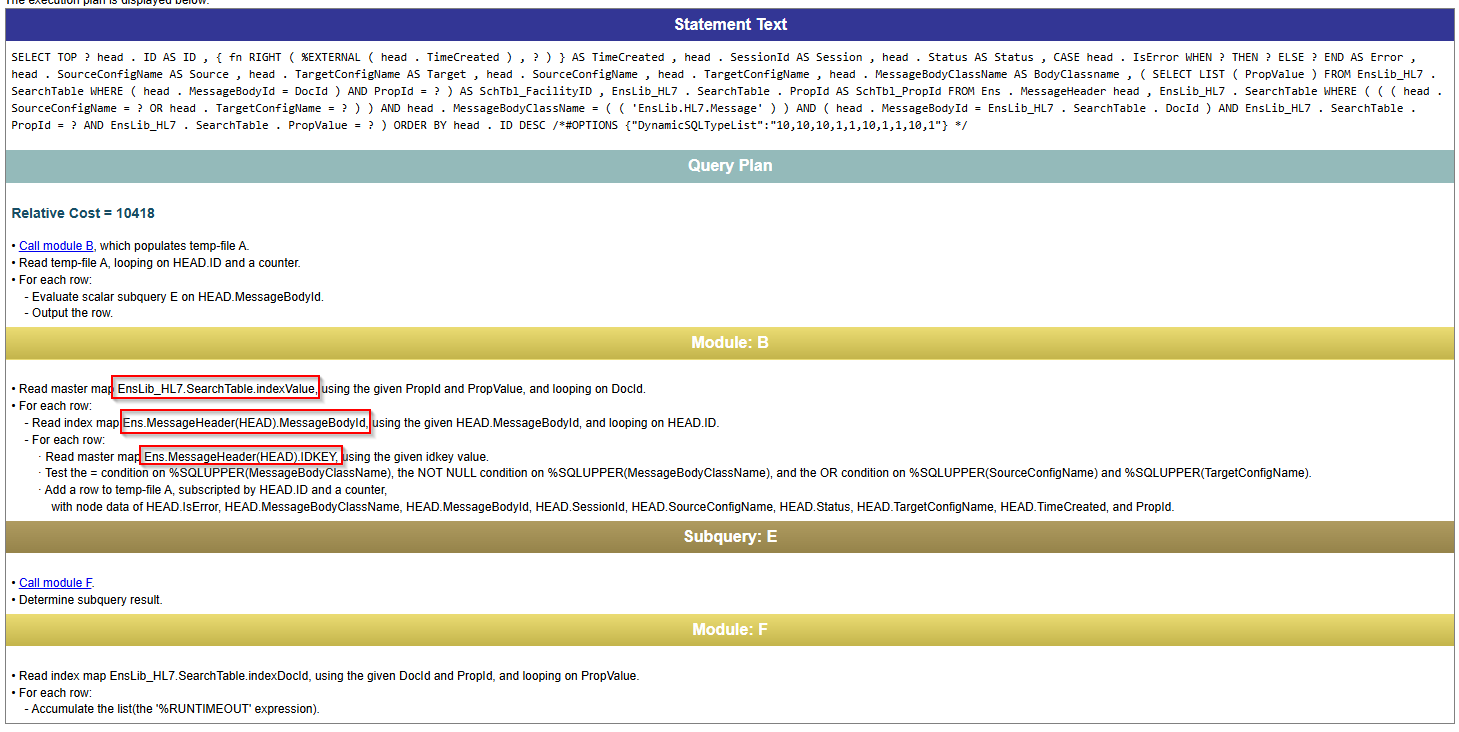
该查询会遍历 SearchTable 中的值,并对每一行与 MessageHeader 表进行交叉引用。对于唯一且关联消息较少的值(例如患者账号),这种方式更为高效。
Unselective="true"(%NOINDEX)SQL 查询计划
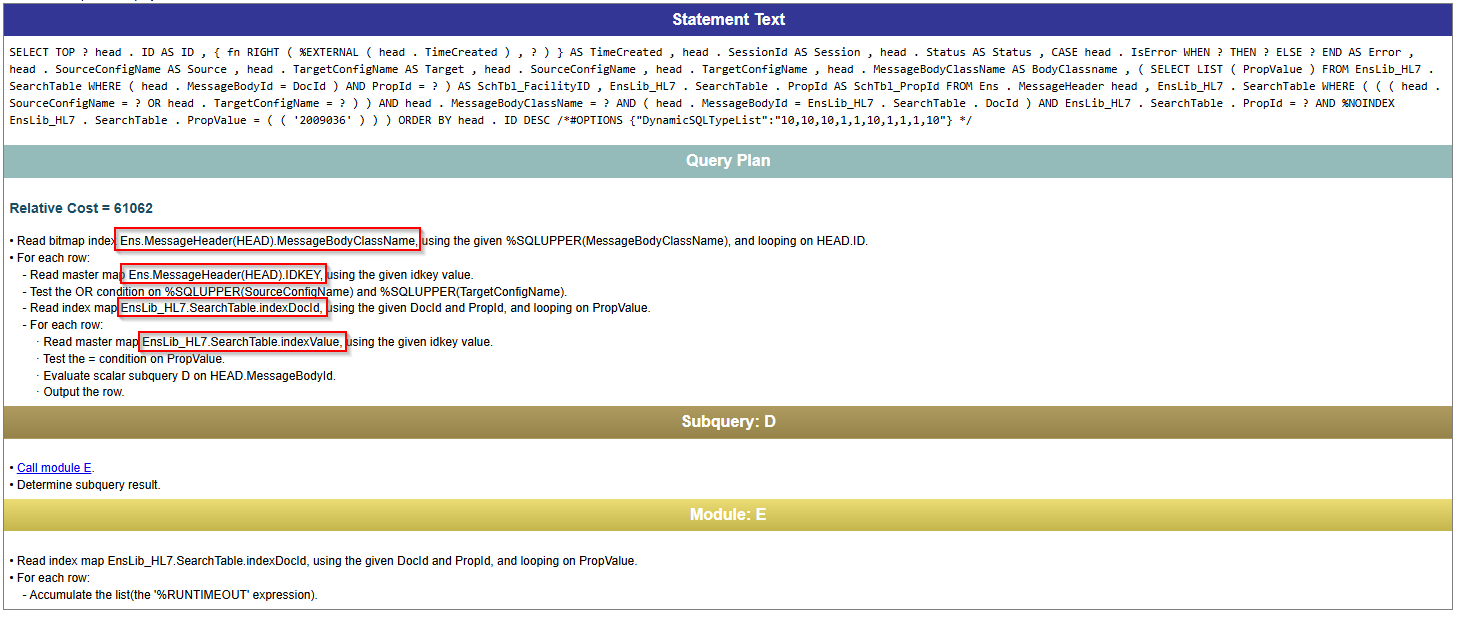
该查询遍历 MessageHeader 表,并对每一行与 SearchTable 中的值进行交叉引用。对于关联结果较多的值(例如 FacilityID),此方法返回结果的速度更快。
如何识别问题字段
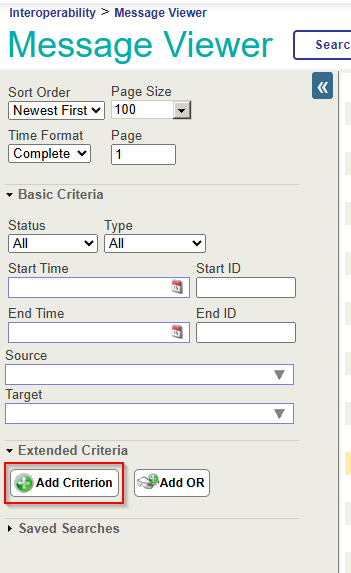
据我观察,识别哪些字段需要标记为 Unselective 的最佳方法是使用 Show Query。 在“消息查看器”中使用每个字段分别创建一个搜索(通过 Add Criterion 添加 SearchTable 字段),然后点击 Show Query,即可查看“消息查看器”根据所选过滤条件提取消息时实际使用的 SQL 语句。
我们的第一个示例使用了“搜索表”中一个未添加“未选中”参数的字段。请注意 EnsLib_HL7.SearchTable.PropId = 19 和 EnsLib_HL7.SearchTable.PropValue = '2009036'。这分别表示作为筛选条件添加的“搜索表”字段以及正在检查的值。 请注意,ProdId 对于每个搜索表字段都是唯一的,并且可能会因环境而异。

如何在消息查看器中添加“显示查询”功能
如果“消息查看器”中未启用“显示查询”按钮,您可以在指定的命名空间中设置以下全局配置。
set ^Ens.Debug("UtilEnsMessages","sql")=1
SQL - Unselective="false"
SELECT TOP 100
head.ID As ID, {fn RIGHT(%EXTERNAL(head.TimeCreated),999 )} As TimeCreated,
head.SessionId As Session, head.Status As Status,
CASE head.IsError
WHEN 1
THEN 'Error' ELSE 'OK' END As Error, head.SourceConfigName As Source,
head.TargetConfigName As Target, head.SourceConfigName, head.TargetConfigName,
head.MessageBodyClassName As BodyClassname,
(SELECT LIST(PropValue)
FROM EnsLib_HL7.SearchTable
WHERE (head.MessageBodyId = DocId) And PropId=19) As SchTbl_FacilityID,
EnsLib_HL7.SearchTable.PropId As SchTbl_PropId
FROM Ens.MessageHeader head, EnsLib_HL7.SearchTable
WHERE (((head.SourceConfigName = 'component_name' OR head.TargetConfigName = 'component_name'))
AND head.MessageBodyClassName=(('EnsLib.HL7.Message'))
AND (head.MessageBodyId = EnsLib_HL7.SearchTable.DocId)
AND EnsLib_HL7.SearchTable.PropId = 19 AND EnsLib_HL7.SearchTable.PropValue = '2009036')
ORDER BY head.ID Desc
接下来,将该查询复制到 SQL 中,并手动修改以添加 %NOINDEX。这正是指示查询不要将该值视为索引的设置。
SQL - Unselective="true" - %NOINDEX
SELECT TOP 100
head.ID As ID, {fn RIGHT(%EXTERNAL(head.TimeCreated),999 )} As TimeCreated,
head.SessionId As Session, head.Status As Status,
CASE head.IsError
WHEN 1
THEN 'Error' ELSE 'OK' END As Error, head.SourceConfigName As Source,
head.TargetConfigName As Target, head.SourceConfigName, head.TargetConfigName,
head.MessageBodyClassName As BodyClassname,
(SELECT LIST(PropValue)
FROM EnsLib_HL7.SearchTable
WHERE (head.MessageBodyId = DocId) And PropId=19) As SchTbl_FacilityID,
EnsLib_HL7.SearchTable.PropId As SchTbl_PropId
FROM Ens.MessageHeader head, EnsLib_HL7.SearchTable
WHERE (((head.SourceConfigName = 'component_name' OR head.TargetConfigName = 'component_name'))
AND head.MessageBodyClassName='EnsLib.HL7.Message'
AND (head.MessageBodyId = EnsLib_HL7.SearchTable.DocId)
AND EnsLib_HL7.SearchTable.PropId = 19 AND %NOINDEX EnsLib_HL7.SearchTable.PropValue = (('2009036')))
ORDER BY head.ID Desc
如果第一个和第二个查询的返回时间存在显著差异,那么你就找到了需要修改的字段。在本例中,查询时间从几分钟后超时缩短到了几乎瞬间返回。
应用修复方案——修改代码
一旦确定了需要修复的字段,您就可以在自定义的 SearchTable 类中,为每个受影响的 Item 添加 Unselective="true"。请参见下例。
自定义 SearchTable 类
/// Custom HL7 Search Table adds additional fields to index.
Class CustomClasses.SearchTable.CustomSearchTable Extends EnsLib.HL7.SearchTable
{

XData SearchSpec [ XMLNamespace = "http://www.intersystems.com/EnsSearchTable" ]
{
<Items>
		// Increase performance by setting Unselective="true" on fields that are not highly unique.
		// This essentially tells Message Search to not use an index on these fields.

		// facility ID in MSH.4
   		<Item DocType=""	PropName="FacilityID" Unselective="true">		[MSH:4]		</Item>
   		// Event Reason in EVN.4
   		<Item DocType=""	PropName="EventReason" Unselective="true">		[EVN:4]		</Item>
   		// Patient Account (Add PV1.19 to prebuilt PID.18 search)
   		<Item DocType=""	PropName="PatientAcct">		[PV1:19]	</Item>
   		// Document type
   		<Item DocType=""	PropName="DocumentType" Unselective="true">	[TXA:2]		</Item>
   		// Placer Order ID
   		<Item DocType=""	PropName="PlacerOrderID">	[OBR:2.1]	</Item>
   		// Filler Order ID
   		<Item DocType=""	PropName="FillerOrderID">	[OBR:3.1]	</Item>
   		// Universal Service ID
   		<Item DocType=""	PropName="ServiceID" Unselective="true">		[OBR:4.1]	</Item>
   		// Universal Service ID
   		<Item DocType=""	PropName="ProcedureName" Unselective="true">	[OBR:4.2]	</Item>
   		// Diagnostic Service Section
   		<Item DocType=""	PropName="ServiceSectID" Unselective="true">	[OBR:24]	</Item>
   		// Appointment ID
   		<Item DocType=""	PropName="AppointmentID">	[SCH:2]		</Item>
   		// Provider Fields
   		<Item DocType=""	PropName="ProviderNameMFN">	[STF:3()]		</Item>
   		<Item DocType=""	PropName="ProviderIDsMFN">	[MFE:4().1]		</Item>
   		<Item DocType=""	PropName="ProviderIDsMFN">	[STF:1().1]		</Item>
   		<Item DocType=""	PropName="ProviderIDsMFN">	[PRA:6().1]		</Item>
	</Items>
}

Storage Default
{
<Type>%Storage.Persistent</Type>
}

}
总结
快速消息搜索对于日常集成操作至关重要。通过利用 Unselective 属性,即使数据库规模不断扩大,现在也能保持这一功能。借助这一快速且易于实施的更改,您将能够重回正轨,在 Health Connect 环境中自信地提供服务并排查问题。