
发布新帖

查找

文章
· 七月 10, 2024 阅读大约需 5 分钟

IRISでシャドウイングの代わりにミラーリングを構成する方法-プログラム編

これは InterSystems FAQ サイトの記事です。
 

こちらの記事では、「IRISでシャドウイングの代わりにミラーリングを構成する方法」を紹介しました。

今回は、「プログラムでシャドウイングの代わりにミラーリングを構成する方法(Windows版)」を紹介します。


【今回のサンプル・ミラー構成について】

  正サーバ(ミラー・プライマリ) 副サーバ(ミラー・非同期)
ミラー名 MIRRORSET MIRRORSET
ミラーメンバ名 MACHINEA MACHINEC
IPアドレス 35.77.84.159 54.248.39.237


では、ミラーの構成手順をご紹介します。手順は以下になります。
 

<ミラーリングのプライマリ設定>     // MACHINEA(正サーバ)

1. ISCAgentの自動起動設定および起動         ※Windowsコマンドプロンプトで実行

C:\Users\Administrator>sc config ISCAgent start=auto
C:\Users\Administrator>sc start ISCAgent


2. [システム管理] > [構成] > [ミラーサービスの有効化]     ※IRISターミナルで実行

zn "%SYS"
set status=##class(Security.Services).Get("%Service_Mirror", .svcProps)
set svcProps("Enabled") = 1
set status=##class(Security.Services).Modify("%Service_Mirror", .svcProps)


3. [システム管理] > [構成] > [ミラーの作成]     ※IRISターミナルで実行

zn "%SYS"
set MirrorSetName="MIRRORSET"
set SystemName = "MIRRORA"     // 任意で設定。設定しない場合、既定で$sysytem 変数の内容を利用(例:<デバイス名>/IRIS)
set MirrorInfo("UseSSL") = 0
set MirrorInfo("ECPAddress") = "xxx.xxx.xxx.xxx"      // this is the SuperServer Address, default value is result of $System.INetInfo.LocalHostName().
set sc = ##class(SYS.Mirror).CreateNewMirrorSet(MirrorSetName, SystemName, .MirrorInfo)
write $system.Mirror.GetMemberType()
// (出力) Failover
write $system.Mirror.GetStatus()
// (出力) PRIMARY、TRANSITIONの場合は少し待って再度実行


4. ローカルデータベースの作成(ミラー属性の追加)     ※IRISターミナルで実行

zn "%SYS"
/// ローカルデータベースの作成
Set Directory="c:\intersystems\iris\mgr\mirrordb\"
Set x=$ZF(-100, "/shell", "mkdir", Directory)
Set db=##Class(SYS.Database).%New()
Set db.Directory=Directory
Set status=db.%Save()
Set DBName="MIRRORDB"
Set status=##class(Config.Configuration).AddDatabase(DBName,Directory)
Set NSName=DBName
Set status=##class(Config.Configuration).AddNamespace(NSName,DBName)

/// ミラー属性の追加(プライマリフェイルオーバーメンバのみ)
set status=##class(SYS.Mirror).AddDatabase(Directory)
set db=##Class(SYS.Database).%OpenId(Directory)
write db.Mirrored
// (出力) 1           ; Mirror DB の場合1
kill


<ミラーリングのDR非同期設定>     // MACHINEC(副サーバ)

1. ISCAgentの自動起動設定および起動         ※Windowsコマンドプロンプトで実行

C:\Users\Administrator>sc config ISCAgent start=auto
C:\Users\Administrator>sc start ISCAgent


2. ミラーサービスの有効化
 *[システム管理] > [構成] > [ミラーサービスの有効化]     ※IRISターミナルで実行

zn "%SYS"
set status=##class(Security.Services).Get("%Service_Mirror", .svcProps)
set svcProps("Enabled") = 1
set status=##class(Security.Services).Modify("%Service_Mirror", .svcProps)


3. 非同期としてミラーに参加
 *[システム管理] > [構成] > [非同期として参加]     ※IRISターミナルで実行

zn "%SYS"
set MirrorSetName="MIRRORSET"
set InstanceName="IRIS"            // primary instanace name
set AgentAddress="xxx.xxx.xxx.xxx" // primary member DNS name or IPaddress
set AsyncMemberType=0              // DR:0, Reporting R only:1, Reporting R/W:2
set SystemName = "MIRRORC"         // 任意で設定。設定しない場合、既定で$sysytem 変数の内容を利用
set LocalInfo("ECPAddress") = "yyy.yyy.yyy.yyy" // this is the SuperServer Address, default value is result of $System.INetInfo.LocalHostName().
set status=##class(SYS.Mirror).JoinMirrorAsAsyncMember(MirrorSetName,SystemName  ,InstanceName,AgentAddress,,AsyncMemberType,.LocalInfo)
write $system.Mirror.GetMemberType()
// (出力) Disaster Recovery
write $system.Mirror.GetStatus()
// (出力) CONNECTED、TRANSITIONの場合は少し待って再度実行


4. ミラーデータベースの準備

非同期の副サーバ:MACHINEC に、正サーバ:MACHINEA のバックアップファイルをリストアします。

【補足】
データベースファイル(IRIS.DAT)のコピーによるバックアップの場合は(=正サーバで Backup.Generalクラスの ExternalFreeze()/ExternalThaw() を利用してバックアップを取っている場合)、非同期データベースをディスマンとした状態でデータベースファイル(IRIS.DAT)を置換します。

※ローカルデータベースの作成手順は、正サーバ:MACHINEAと同じです。
  (4の「ローカルデータベースの作成」、ミラー属性の追加 以外を行います)

※外部/オンラインバックアップ・リストアについては、以下の記事で詳細手順を説明していますので、参考になさってください。
外部バックアップについて
オンラインバックアップについて


5. ミラーモニターでのジャーナルの有効化、キャッチアップ     ※IRISターミナルで実行

zn "%SYS"
set Directory="c:\intersystems\iris\mgr\mirrordb\"
set status=##class(SYS.Mirror).ActivateMirroredDatabase(Directory)  // 有効化
set db=##class(SYS.Database).%OpenId(Directory)
set sfn= db.SFN  // sfn system file number データベーステーブル(内部情報)内の番号
kill db
set status=##class(SYS.Mirror).CatchupDB($lb(sfn))  // キャッチアップ
write status     // 1 でキャッチアップ成功。それ以外の場合は write $SYSTEM.Status.DisplayError(status) でエラーの内容を確認


6. 管理ポータルで、キャッチアップしたことを確認(こちらで構成は終了です)
 *[システムオペレーション] > [ミラーモニタ]
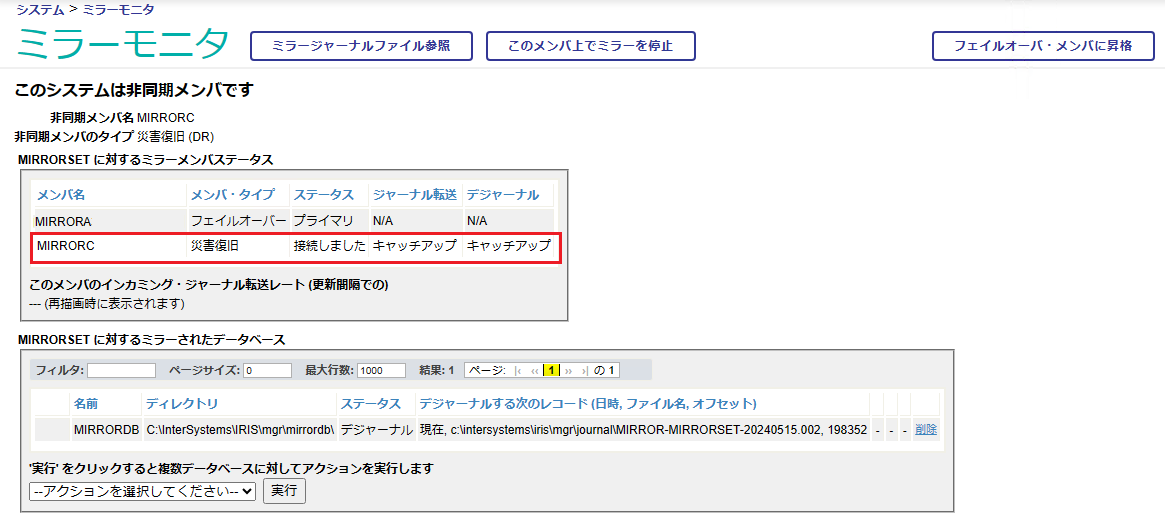


各種設定の詳細は以下のドキュメントをご覧ください。
Security.Services
SYS.Mirror
$SYSTEM.Mirror


enlightened【ご参考】
Cache Mirroring 101:簡単なガイドとよくある質問  
ミラーリングの機能について
ミラージャーナルファイルの削除のタイミングと要件
IRISでシャドウイングの代わりにミラーリングを構成する方法

讨论 (0)0
登录或注册以继续
InterSystems 官方
· 七月 9, 2024

Git-source-control launches release 2.4.0 with a new basic mode

The Application Services team is pleased to announce the release of git-source-control version 2.4.0, introducing several new features to the open-source project.

For those unfamiliar, git-source-control is an embedded (or "server-side") source control tool for InterSystems products, installed through the InterSystems Package Manager.


Here are the key additions to the 2.4.0 release:

  1. Basic Mode

Basic mode presents an overall great simplification to the git workflow, suitable for users with less knowledge of git as a source control tool. The basic mode has been explicitly developed for the feature branch and trunk-based models of development.

In basic mode, the typical flow of staging, committing, pulling and then pushing has been enveloped in a 'Sync' operation. Users need only choose the 'Sync' operation from the menu, and their local changes will automatically be synchronized with the corresponding branch in the remote repository (on GitHub, GitLab, etc.).

To enable basic mode, simply navigate to the 'Settings' page of the git-source-control tool, either through the embedded menu or the web UI, and select the 'Use Basic Mode' option in the user settings at the bottom of the page.

        2. Revamped Workspace UI

The workspace section of the git-source-control Web UI provides an area for users to take actions on changes to their repository.

Previously, it was divided into four segments, a diff view, a working copy view, a commit message view and a staging area.


With the new workspace view, the working copy and staging area have been collapsed into a single list of files with checkboxes, and it's clearer that the commit message is a text field. The diff view has been enhanced, allowing uncommitted files from other IRIS users to be viewed in the diff view, which previously was not supported. We believe these changes make the user interface much more intuitive.


          3. Default Merge Branch

In basic mode, a new setting for the 'default merge branch' allows users to specify a branch whose remote copy will be merged into the current branch before pushing to the remote repository.

This setting was implemented to provide additional built-in support for the trunk-based source control approach. Merging with this option will also automatically resolve a common class of merge conflict that occurs when multiple developers are working on the same IRIS Interoperability production.


Notable Bug Fixes:

            1. Git commands changing local repository files now synchronize with IRIS

Previously, the checkout, merge, rebase, stash and discard operations did not have their changes to the local file tree reflected by IRIS. Now, upon any of these commands being run, IRIS will update to provide file versions that match the local repository, including deleting files that don't exist in the current branch, or adding files that only exist in the current branch. This also compiles the changed files, which is especially important for changes to interoperability productions to reflect in the Production Configuration page.

             2. Deleted files are now shown in the Workspace UI

Previously, files deleted in the repository would not show up as one of the changes in the workspace. This meant that deletions would go unstaged and uncommitted, leaving the deleted files lingering in the repository. In the new UI, not only do all types of file changes (including deletions) show in the workspace, but the files are also listed with the corresponding git action, such as "modified", "added", "deleted" or "renamed."


              3. Users with %Developer are now able to perform all actions though the package without the need for added roles

In some cases, users were unable to perform many of the package's operations with being granted additional SQL privileges. This is no longer the case, simplifying security configuration.


For a full list of features and bug fixes introduced by the 2.4.0 release, please see the changelog.md file in the git-source-control repository on GitHub.

We are always looking for feedback and improvements for the git-source-control tool! Please feel free to create a GitHub issue in the repository if you encounter a bug or think an important feature is missing.

1 Comment
讨论 (1)1
登录或注册以继续
讨论 (3)1
登录或注册以继续
文章
· 七月 1, 2024 阅读大约需 6 分钟

This CPU is not supported by this version of IRIS***, which requires "AVX" and "BMI" CPU instructions.

これは InterSystems FAQ サイトの記事です。
 

IRIS2024.1以降のバージョンをインストールしようとした際に、以下のようなエラーになることがあります。

This CPU is not supported by this version of IRISHealth, which requires “AVX” and “BMI” CPU instructions.


これは、2024.1以降のバージョンより最小CPUの条件として、AVX および BMI 拡張命令が含まれることが条件となっているのですが、ご使用の環境に含まれない(仮想環境やFTサーバ等の特殊なシステムでは無効化されている場合も)ときに出力されるエラーです。

最小CPUサポートバージョンについては、以下のドキュメントをご覧ください。
Minimum Supported CPU

現在使用中のCPUの拡張命令セットの情報の確認方法については、以下のDC記事をご覧ください。
CPU のマイクロアーキテクチャファミリと命令セットの判定方法


Linuxの場合は、lscpuコマンド、または lshw -class processor コマンドで確認できます。

実行例:

lscpu
アーキテクチャ:                      x86_64
CPU 操作モード:                      32-bit, 64-bit
バイト順序:                          Little Endian
CPU:                                 1
オンラインになっている CPU のリスト: 0
コアあたりのスレッド数:              1
ソケットあたりのコア数:              1
ソケット数:                          1
NUMA ノード数:                       1
ベンダー ID:                         GenuineIntel
BIOS Vendor ID:                      GenuineIntel
CPU ファミリー:                      6
モデル:                              142
モデル名:                            Intel(R) Core(TM) i7-8665U CPU @ 1.90GHz
BIOS Model name:                     Intel(R) Core(TM) i7-8665U CPU @ 1.90GHz
ステッピング:                        12
CPU MHz:                             2112.006
BogoMIPS:                            4224.01
ハイパーバイザのベンダー:            VMware
仮想化タイプ:                        完全仮想化
L1d キャッシュ:                      32K
L1i キャッシュ:                      32K
L2 キャッシュ:                       256K
L3 キャッシュ:                       8192K
NUMA ノード 0 CPU:                   0
フラグ:                              fpu vme de pse tsc msr pae mce cx8 apic sep mtrr pge mca cmov pat pse36 clflush mmx fxsr sse sse2 ss syscall nx pdpe1gb rdtscp lm constant_tsc arch_perfmon nopl xtopology tsc_reliable nonstop_tsc cpuid pni pclmulqdq ssse3 fma cx16 pcid sse4_1 sse4_2 x2apic movbe popcnt tsc_deadline_timer aes xsave avx f16c rdrand hypervisor lahf_lm abm 3dnowprefetch invpcid_single ssbd ibrs ibpb stibp fsgsbase tsc_adjust bmi1 avx2 smep bmi2 invpcid rdseed adx smap clflushopt xsaveopt xsavec xsaves arat flush_l1d arch_capabilities


または

sudo lshw -class processor
 *-cpu:0          
    description: CPU

    capabilities: lm fpu fpu_exception wp vme de pse tsc msr pae mce cx8 apic sep mtrr pge mca cmov pat pse36 clflush mmx fxsr sse sse2 ss syscall nx pdpe1gb rdtscp x86-64 constant_tsc arch_perfmon nopl xtopology tsc_reliable nonstop_tsc cpuid tsc_known_freq pni pclmulqdq ssse3 fma cx16 sse4_1 sse4_2 x2apic movbe popcnt tsc_deadline_timer aes xsave avx f16c rdrand hypervisor lahf_lm abm 3dnowprefetch ssbd ibrs ibpb stibp fsgsbase tsc_adjust bmi1 avx2 smep bmi2 invpcid rdseed adx smap clflushopt clwb sha_ni xsaveopt xsavec xsaves arat flush_l1d arch_capabilities


Windowsの場合は、coreinfo ユーティリティで確認できます。

実行例:

C:\work\Coreinfo>Coreinfo64.exe
Coreinfo v3.6 - Dump information on system CPU and memory topology
Copyright (C) 2008-2022 Mark Russinovich
Sysinternals - www.sysinternals.com 13th Gen Intel(R) Core(TM) i7-1365U
Intel64 Family 6 Model 186 Stepping 3, GenuineIntel
Microcode signature: 00004114

AES             *       Supports AES extensions
AVX             *       Supports AVX instruction extensions
AVX2            *       Supports AVX2 instruction extensions

AVX-512-F       -       Supports AVX-512 Foundation instructions
AVX-512-DQ      -       Supports AVX-512 double and quadword instructions
AVX-512-IFAMA   -       Supports AVX-512 integer Fused multiply-add instructions
AVX-512-PF      -       Supports AVX-512 prefetch instructions
AVX-512-ER      -       Supports AVX-512 exponential and reciprocal instructions
AVX-512-CD      -       Supports AVX-512 conflict detection instructions
AVX-512-BW      -       Supports AVX-512 byte and word instructions
AVX-512-VL      -       Supports AVX-512 vector length instructions
FMA             *       Supports FMA extensions using YMM state
MSR             *       Implements RDMSR/WRMSR instructions
MTRR            *       Supports Memory Type Range Registers
XSAVE           *       Supports XSAVE/XRSTOR instructions
OSXSAVE         *       Supports XSETBV/XGETBV instructions
RDRAND          *       Supports RDRAND instruction
RDSEED          *       Supports RDSEED instruction CMOV            *       Supports CMOVcc instruction
CLFSH           *       Supports CLFLUSH instruction
CX8             *       Supports compare and exchange 8-byte instructions
CX16            *       Supports CMPXCHG16B instruction
BMI1            *       Supports bit manipulation extensions 1
BMI2            *       Supports bit manipulation extensions 2

ADX             *       Supports ADCX/ADOX instruction:

(※ * になっていればOK)


enlightened【ご参考】
InterSystems IRIS ミニマムサポート CPU モデル

讨论 (0)0
登录或注册以继续
问题
· 七月 1, 2024

while debugging in vscode how do I enter a response to a READ command

When debugging a routine in vscode which requires input to a READ, there doesn't appear to be any way to enter the input.  If the routine is running in a terminal with vscode attached then input can be done there, but can it be done with no attached process?

8 Comments
讨论 (8)4
登录或注册以继续
