发布新帖

查找

公告
· 六月 11, 2020

Visualising your Global Storage using QEWD Monitor

The latest WebComponent-based, SB Admin 2-themed QEWD Monitor application now includes a cool D3-based viewer for visualising your IRIS or Cache Globals - see example below

This qewd-monitor-adminui application is automatically installed when you install QEWD on a Windows machine

See here for details on installing QEWD on Windows:

https://github.com/robtweed/qewd-microservices-examples/blob/master/WINDOWS-IRIS-2.md#initial-steps
 

1 Comment
讨论 (1)1
登录或注册以继续
文章
· 六月 4, 2020 阅读大约需 1 分钟

Easy data import into IRIS

Sometimes you need quickly and easily import data into IRIS. For this, an IRIS import manager has been developed.

This application allows you to import JSON data and also provides a really simple interface for transferring data from MongoDB collections to IRIS globals. It has never been so easy.

Let's look at examples.

Import JSON

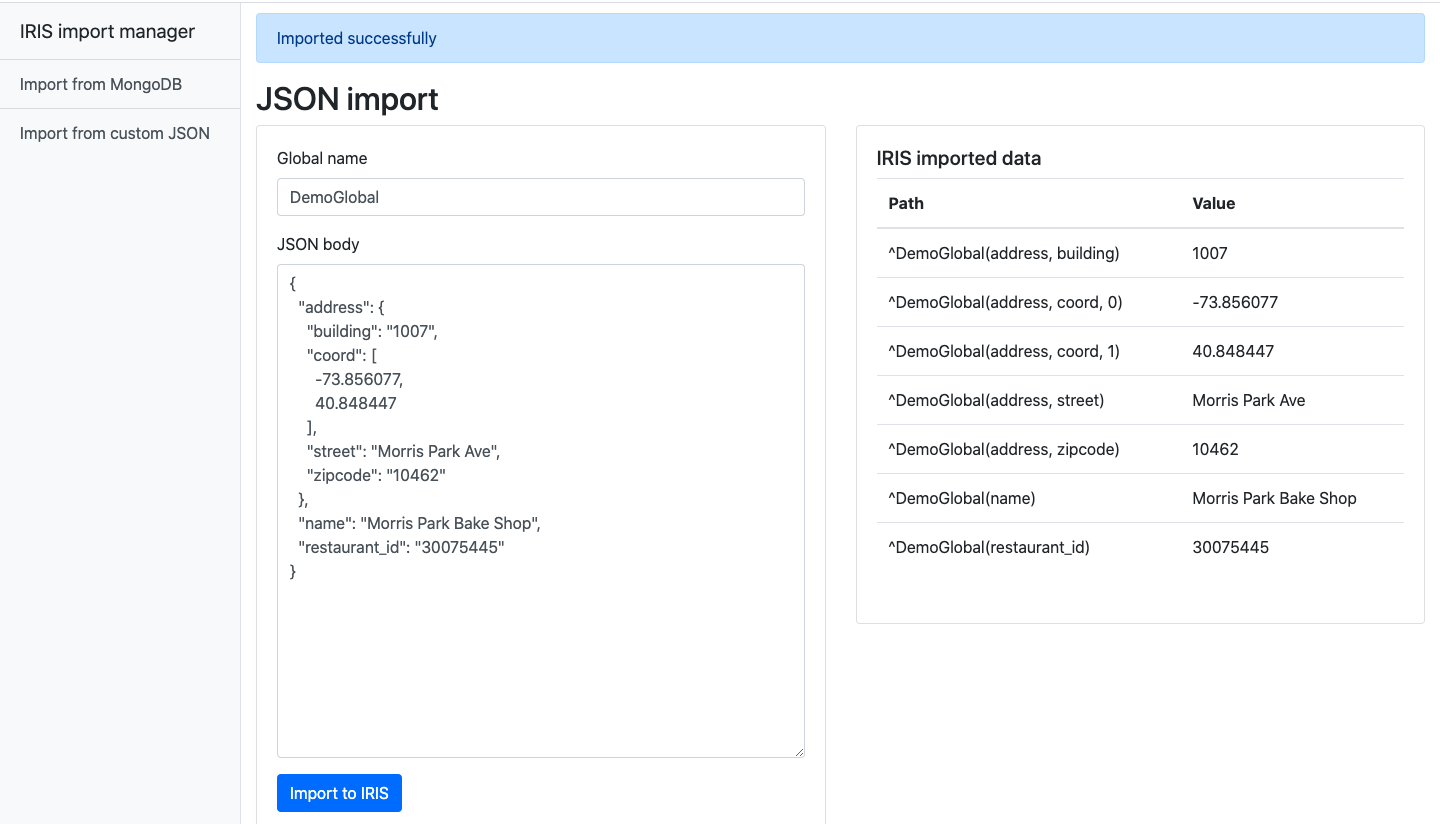
Suppose we have data in JSON format and we want to import it into IRIS. To do this, you just need to specify the global name and insert the data. After import, you will see the imported data. If global exists data will be overwritten.


Import MongoDB collections


There is a collection navigation on the main page.


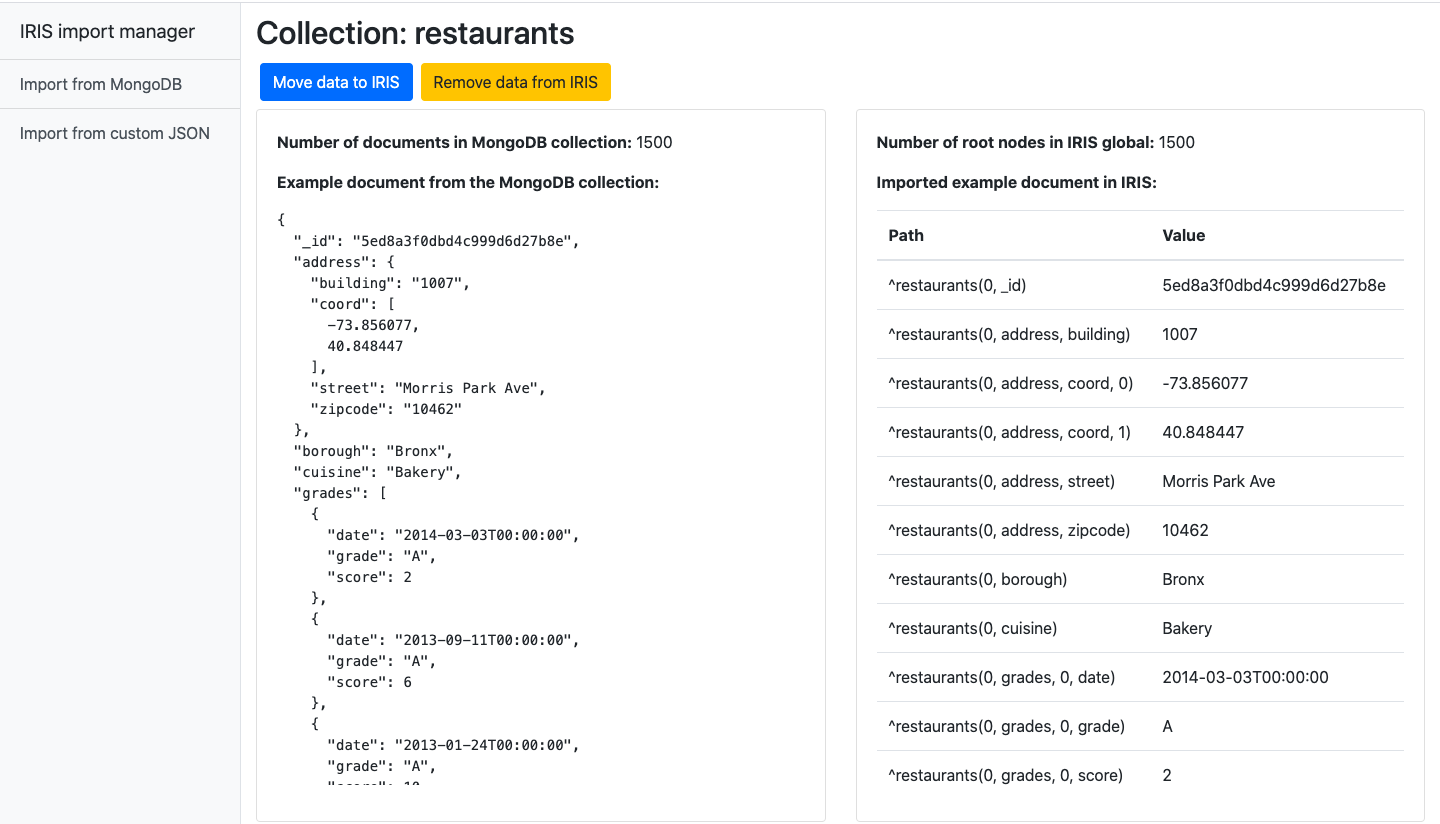
Just open the collection and you will see information about it and import control buttons that allow you to transfer data to IRIS or clear it.

After import, you will also see the imported data.


What other imports would you like to have in this application? Any ideas are very welcome.

5 Comments
讨论 (5)0
登录或注册以继续
问题
· 五月 20, 2020

Wanted : IRISsession for Windows

In Cache for Windows (x86-64) 2018.1.3 (Build 414U) I found something very useful

%installdir%\bin\Csession.exe

I miss something similar in my IRIS for Windows (x86-64) 2020.1 (Build 215U)

neither IRISsession.exe  nor iris session ... nor similar

is available.

And YES,   I know irisdb.exe -s ..\mgr comes close to it.
So I wrote my own IRISsession.bat to cover my disappointment.

:: IRISsessin.bat
:: rcc's fake for the missing irissession.exe in Windows distribution
irisdb.exe -s ..\mgr %*

or did I miss something ?

For me, it looks now the ~same for Linux/UNIX and Windows

>> C:\InterSystems\IRIS\bin>irissession -U %SYS JOBEXAM

Not a big thing, nevertheless boring to distribute it to all installations.

4 Comments
讨论 (4)2
登录或注册以继续
文章
· 五月 14, 2020 阅读大约需 1 分钟

IRS Docker micro Durability

Allow limited durability for demo and development IRIS-Docker-micro-Durability During development of a container based demo I found the need to access a fresh docker
an instance of IRIS image (e.g intersystems/iris-community:2020.2.0.199.0) over and over.
To bypass loading my code repeatedly, I developed this workaround.

Docker support

The principle of a persistent IRIS database outside the container is unchanged.
But now the whole setup is moved into Dockerfile and docker-compose.yml

Prerequisites

Make sure you have git and Docker desktop installed.

Installation

Clone/git pull the repo into any local directory

  git clone https://github.com/isc-at/IRIS-Docker-micro-Durability  

Open the terminal in this directory build and run the container:

  docker-compose up -d   

How to use it

Your container has now an external IRIS.DAT in </installdir>/demo/
It is setup as a working DB for Globals and Routines in namespace USER
REMEMBER: this is just for the content of this namespace

GitHub

讨论 (0)1
登录或注册以继续
文章
· 五月 14, 2020 阅读大约需 3 分钟

websocket-client-js * iris-native-api * docker-micro-server

Using the IRIS native API for Node.JS was the opportunity to present
a MicroService operating in a Docker container.
A demo video is now also available to watch the demo in operation.

Instead of a utility you call directly on your IRIS host you now send a work-packages
to the MicroService as would typically do with System Interoperability (aka.ENSEMBLE):
of course, you have the option of more than one WebSocket Server.
Once the WebSocket Client Service has done its job you get back the result from it.

The advantage over the built-in WebSocket Client is, that all Network, Security,
Firewall issues are kept away from the core data server. Not to talk about the
experience and quality Node.js has in this arena.

The demo uses wss://echo.websocket.org/ as default EchoServer
Next you enter some lines of text.
At any point you can add "Lorem Ipsum" text for more content between your own text.
Next you sent it to the service and wait for the echo.
There is also the option to change your text before sending
as Exit the control program or Stop the service.

All this processing runs asynchronously.
Instead of waiting for completion, the Listener displays periodically
what was received from Echo so far.

To install it you need a

  • docker image for IRIS ( intersystems/iris-community:2020.2.0.199.0 )
  • docker image for the WebSocket MicroServer (rcemper/rcc:demoJS)
  • ################ _alternative variant since 2020-05-25 ################ just run this docker command for init
      docker run --name ini1 --init -it --rm \
        -privileged -v $(pwd):/external \
        rcemper/rcc:demoJS bash /rcc/init.sh   
    

################ the inital advise is still valid ################

To run it start IRIS first (either -d or -it to observe the behaviour) from directory demo (!)

docker run --name iris1 --init --rm -d \   
-p 52773:52773 -p 51773:51773 \   
-v $(pwd):/external \   
intersystems/iris-community:2020.2.0.199.0 \   
-b /external/pre.copy   

next start the MicroServer

docker run --name rcc1 --init -it --rm \  
rcemper/rcc:demoJS \  
/usr/bin/node \  
/rcc/nodejs/WSockIris.js \  
$(hostname -I)  

as you started it with -it you see

platform = linux: ubuntu  

    *****************************  
    Connect to IRIS on: 192.168.0.23  
Successfully connected to InterSystems IRIS.  
    *** wait 3sec for request ***  
    ******* Startup done ********  

    *** wait 3sec for request ***  
    *** wait 3sec for request ***  

then the control application in a new Linux terminal

docker exec -it iris1 iris session iris ZSocket  

and you see

*** Welcome to WebSocket Micoservice demo ***  
Known Hosts (*=Exit) [1]:  
1  wss://echo.websocket.org/  
2  --- server 2 ----  
3  --- server 3 ----  
select (1):  ==> wss://echo.websocket.org/  
#
Enter text to get echoed from WebSocketClient Service
Terminate with * at first position
or get generated text by %
or append new text with @

1    hello socket microServer
2    now you got 2 lines
3    *

Select action for WebClient Service
New EchoServer (E), Send+Listen(S),New Text(N),Exit(X), Exit+Stop Client(Z) [S]s
%%%%%%%%%%%%%%%%%%%%%%%%%%

******* 0 Replies *******

******* 2 Replies *******
1    hello socket microServer
2    now you got 2 lines


Select action for WebClient Service

and on MicroService

*** wait 3sec for request ***
echoserver:  wss://echo.websocket.org/
** Lines to process: 1 **
********* next turn *********
* WebSocket Client connected *
****** Client is ready ****** 

Line: 1 text> 'hello socket microServer '
Received: 1 > 'hello socket microServer '

Line: 2 text> 'now you got 2 lines '
Received: 2 > 'now you got 2 lines '

******* lines sent: 2 ******
*** replies received: 2 ****

*** wait 3sec for request ***

Late warning. always check the version of your image!
I just fell into  intersystems/iris-community:2020.2.0.204.0

NOTICE: ALL SCRIPTS ARE TESTED FOR LINUX ONLY !


Readme Windows

GitHub

讨论 (0)2
登录或注册以继续