发布新帖

Encontrar

公告
· 五月 12, 2020

Global Masters Gamification Hub - Start Here

Hi Community!

We're pleased to invite all DC members to the InterSystems Global Masters Gamification Platform to get points and prizes for your contribution to the Community, learn with selected content about InterSystems technology, network with your peers and have fun!

 

▶️  What is Global Masters?

Global Masters is a gamification platform, where you learn technology, complete tech quizzes, watch videos, etc. You will be completing challenges (tasks) related to ISC technology, earning badges & points, and exchanging points for a variety of rewards.

Each week 5-10 new challenges are issued announcing the most interesting articles on DC, best practices, videos, official InterSystems news, learning, and also fun tasks. That's a good way to stay up to date!    

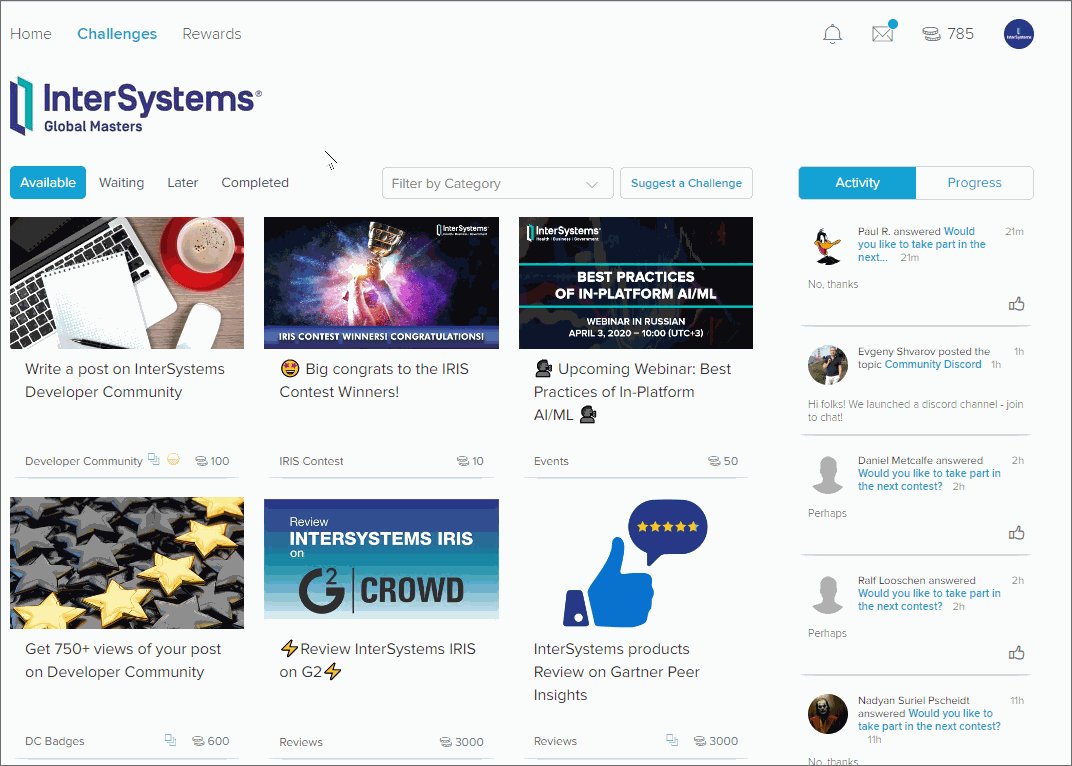
▶️  How does it look? Here's a sample of challenges and rewards:


▶️  Levels, Badges, and Privileges

There are 6 Levels in Global Masters. The higher level you are, the more valuable prizes and privileges are available for you. Contribute to Developer Community and Open Exchange, stay active on Global Masters to achieve the highest levels.

List of all levels and badges that will help you to advance to the next level.


▶️  How to Join  

  1. Go to globalmasters.intersystems.com, click on the "SIGN IN with your InterSystems login" button, and use your InterSystems SSO credentials. 
  2.  After you logged in, complete the challenge "Customize your program! START HERE!". This onboarding challenge unlocks all other challenges.


We are waiting for all InterSystems Developers in the Global MAsters Hub!

And we are very open to your feedback and ideas. Feel free to contact us at any time.

See you on InterSystems Global Masters today! 

 

6 Comments
讨论 (6)2
登录或注册以继续
公告
· 四月 29, 2020

ZPM and Open API Bonuses for REST API Programming Contest

Hi Developers!

As you know in the second contest we introduced technology bonuses. Learn more.

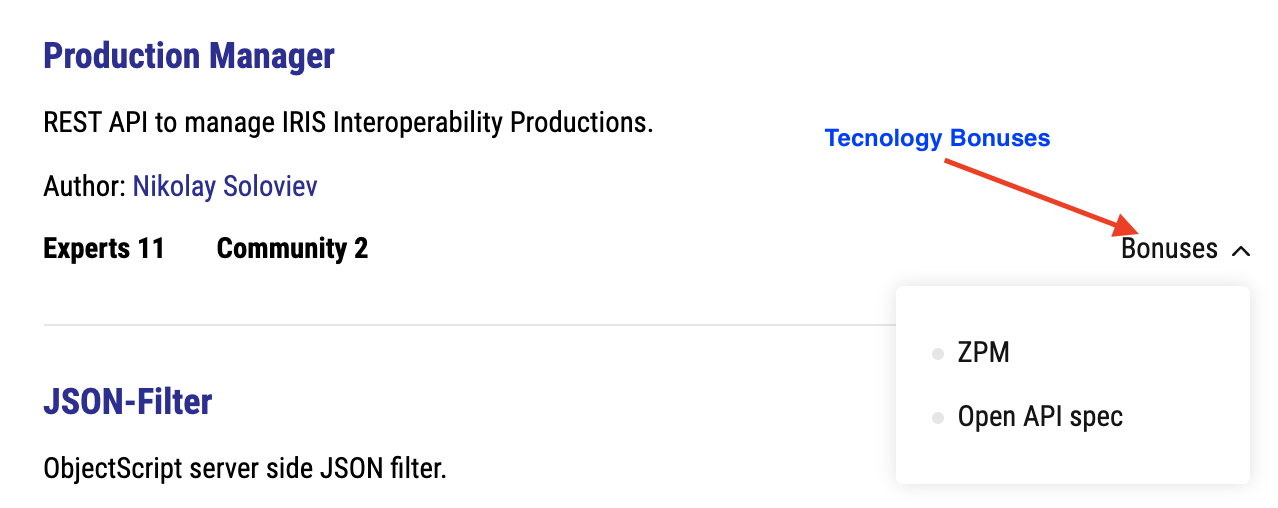
You can see what app got what bonuses in the Technology Bonuses menu:

And here I want to share with you which apps got the bonus. Here we go!

ZPM Module Bonus

To get the ZPM bonus contestants should have published a module in the community Package Manager.

Here are the projects which managed it:

Project
ZPM Command
   Production Manager    install production-manager
   JSON-Filter    install json-filter
   iris-history-monitor    install iris-history-monitor
   simple-spellchecker    install simple-spellchecker
   isc-apptools-admin    install isc-apptools-admin

ZPM gives a very handy way to install the app, e.g. all the above modules could be tested with the following 3 commands:

1. Launch IRIS:

$ docker run --name my-iris -d --publish 9091:51773 --publish 9092:52773 intersystemsdc/irishealth-community:2020.2.0.196.0-zpm

2. Open IRIS terminal and launch ZPM:

$ docker exec -it my-iris iris session IRIS

USER>zpm

zpm:USER>

3.  Install a module: 

zpm:USER>install module-name

All these projects get one export point for the ZPM implementation! Congrats!

Open API spec
To get Open API spec bonus contestants should have introduced the /_spec endpoint to their API which exposes OPEN API description of their REST API.

Here are projects which did it:

Project
Endpoint
   Production Manager    /production/_spec
   JSON-Filter    /jsonfilterrest/_spec
   REST for Tasks on my Status Report    /crud/task/_spec

All these projects get one export point for the Open API Spec! Congrats!

Open API spec can be easily read with Postman, or Swagger UI, or in IRIS, if you install swagger-ui module:

zpm:USER>install swagger-ui

And if you open:

localhost:52773/swagger-ui/index.html 

and put the URL of the spec into it, and get the following UI page, e.g. like this one:

swagger-ui

Spec-first approach

To get spec-first bonus contestants should apply an app where REST API on the IRIS side is being generated from Open API spec prepared in advance.

Nobody did this!

Nevertheless, this is a great approach to develop REST APIs! I hope you'll use it in your development!

Good luck in the voting and healthy coding!

讨论 (0)1
登录或注册以继续
文章
· 四月 27, 2020 阅读大约需 2 分钟

Multidimensional Property Persistence - Part 2 (New Age)

While the classic solution followed rather close the concepts and design of the ancestors
Caché / IRIS allows a more modern approach to flexible/multidimensional properties


Let's see our demo class as before:

Class DC.Multi Extends (%Persistent, %Populate) [ Final ]
{
Property Name As %String;
Property DOB As %Date;
Property mJSON As %DynamicObject;
///  Property Multi As %String [ MultiDimensional ];


The JSON object allows us all the flexibility you may need
with the key-value paradigm as a basic concept.

The storage map honors this with a suitable entry.


Storage Default
{
<Data name="MultiDefaultData">
  <Value name="1">
    <Value>Name</Value>
  </Value>
    <Value name="2">
    <Value>DOB</Value>
  </Value>
</Data>
<Data name="mJSON">
  <Attribute>mJSON</Attribute>
  <Structure>node</Structure>
  <Subscript>"mJSON"</Subscript>
</Data>

<DataLocation>^DC.MultiD</DataLocation>
<DefaultData>MultiDefaultData</DefaultData>
<IdLocation>^DC.MultiD</IdLocation>
<IndexLocation>^DC.MultiI</IndexLocation>
<StreamLocation>^DC.MultiS</StreamLocation>
<Type>%Storage.Persistent</Type>
}


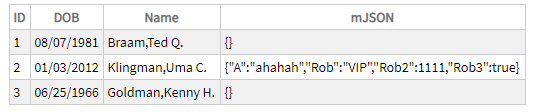
Diagnosis: The storage generator has already foreseen the structure we had previously to add manually.

Issue #1) doesn't exist anymore

The same for issue #2)  no extra fiddling for SQL. Access out of the box.


I admit, my fantasy for test data was rather limited.wink

So what's the price for this improvement ?

Instead of:        
Set obj.Multi("robert")="rcc"
it is now :          Do obj.mJSON.%Set("robert","rcc")
a substructure comparable to obj.Multi("robert",1) might require a dynamic array

instead of navigation by $order() and $query() you now use an iterator and operate full JSON compatible.

retrieving data by         
set var=obj.Multi("robert") 
or similar changes to   set var=obj.mJSON.%Get("robert")

Personally I find this a much cleaner approach and it is independent of registered or persistent objects
 

1 Comment
讨论 (1)1
登录或注册以继续
文章
· 四月 27, 2020 阅读大约需 4 分钟

Multidimensional Property Persistence - Part 1 (Classic)

As you know in Caché / IRIS you have the possibility to define a property as Multidimensional as documented here:
https://docs.intersystems.com/iris20201/csp/docbook/DocBook.UI.Page.cls?KEY=GOBJ_proplit#GOBJ_proplit_multidim
and the explanation of how to use it
https://docs.intersystems.com/iris20201/csp/docbook/Doc.View.cls?KEY=GOBJ_proplit#GOBJ_proplit_multidim_values

Though the access is quite comfortable (in traditional COS sense) there are 2 main restrictions that hurt:

#1) It is not saved to disk unless your application includes code to save it specifically.
#2) It cannot be stored in or exposed through SQL tables
   there are some more
I'll show how to overcome these limits

#1)  Let's take this simple class as example:

Class DC.Multi Extends (%Persistent, %Populate) [ Final ]
{
    Property Name As %String;
    Property DOB As %Date;
    Property Multi As %String [ MultiDimensional 
] ;

The storage map already shows issue #1 no place for "Multi"

Storage Default
{
  <Data name="MultiDefaultData">
    <Value name="1">
      <Value>Name</Value>
    </Value>
    <Value name="2">
      <Value>DOB</Value>
    </Value>
  </Data>
  <DataLocation>^DC.MultiD</DataLocation>
  <DefaultData>MultiDefaultData</DefaultData>
  <IdLocation>^DC.MultiD</IdLocation>
  <IndexLocation>^DC.MultiI</IndexLocation>
  <StreamLocation>^DC.MultiS</StreamLocation>
  <Type>%Storage.Persistent</Type>
}

so we add 2 Methods:

/// save Multidimensional property
Method %OnAfterSave(insert As %Boolean) As %Status [ Private, ServerOnly = 1 ]
{    Merge ^(..%Id(),"Multi")=i%Multi quit $$$OK   }

/// load Multidimensional property
Method %OnOpen() As %Status [ Private, ServerOnly = 1 ]
{   Merge i%Multi=^(..%Id(),"Multi") quit $$$OK  }

we just attach the orphaned structure to our actual object.


To be honest:
This is not my invention, but the (simplified) approach that was used
in class %CSP.Session when it was written around the start of the millennium.


With the next simple add-on your multidimensional structure becomes persistent.

The object in memory looks like this:

CACHE>zw o2
o2=3@DC.Multi  ; <OREF>
+----------------- general information ---------------
|      oref value: 3
|      class name: DC.Multi
|           %%OID: $lb("2","DC.Multi")
| reference count: 2
+----------------- attribute values ------------------
|       %Concurrency = 1  <Set>
|                DOB = 62459
|         Multi("a") = 1
|     Multi("rob",1) = "rcc"
|     Multi("rob",2) = 2222
|               Name = "Klingman,Uma C."
+-----------------------------------------------------

and that's the related storage, a nice multidimensional global:

CACHE>zw ^DC.MultiD(2)
^DC.MultiD(2)=$lb("Klingman,Uma C.",62459)
^DC.MultiD(2,"Multi","a")=1
^DC.MultiD(2,"Multi","rob",1)="rcc"
^DC.MultiD(2,"Multi","rob",2)=2222

OK so far:

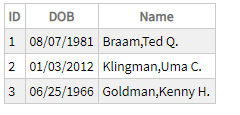
#2) SELECT * from DC.Multi
has no idea what a column "Multi" might be.

so we add an SQLfriedly calculated property and some appropriate styling.

Property SqlMulti As %String(MAXLEN = "") [ Calculated, SqlComputed,
SqlComputeCode 
= { set {*}= ##class(DC.Multi).ShowMulti({ID}) } ];
ClassMethod ShowMulti(id) As %String(MAXLEN="")
{  set res="{"
      ,obj=..%OpenId(id)
   if $isobject(obj) {
      set qry=$query(obj.Multi(""),1,value)
      while qry'="" {
         set res=res_$piece(qry,".",2,99)_"="_value_","
            ,qry=$query(@qry,1,value)
         }
     set $extract(res,*)=""
   }
   quit res_"}"   
}

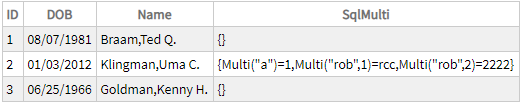
And it looks like this

No need to say that the design is totally in your hands.

As there is evident progress from the past the next article will show
you a solution more appropriate to the new century.


1 Comment
讨论 (1)1
登录或注册以继续
文章
· 四月 26, 2020 阅读大约需 5 分钟

Materialized Views

A VIEW in SQL is basically a prepared SQL statement.
It has to be executed and assembled like any other SQL query.
MATERIALIZED VIEW means that the content is collected before hands and can be retrieved rather fast.
I saw the concept first with my favorite competitor named O* and they made a lot of noise about it.

  { favorite: because I could win every benchmark against them devil }

Depending on the individual construction of this materialized views updates and maintenance might be required.

In Caché / IRIS this exists almost since ever and we take this as normal and a given fact.
Most developers are just not aware of it and with a little bit of polishing it can be presented as an excellent feature.
In addition, any update and maintenance happen as a built-in functionality with no extra effort.


See this example:
In our famous Sample.Person class in namespace SAMPLES I have extended and rebuilt his index.

/// Define an index for <property>Name</property>.
Index NameIDX On Name [ Data = (Name, Home.State, SSN) ];

And being experienced and comfortable with the query generator you know that

SELECT ID, Name, Home_State, SSN   from Sample.Person 

will run fast across just using the index global  ^Sample.PersonI("NameIDX")
and never touch you data global.

That's basically the functionality of a Materialized View and update is implicit.

Defined as VIEW (from MgmtPortal as Studio isn't so handy) you get this class.

Class Sample.Person.NameView [ ClassType = view
                             ,
CompileAfter = Sample.Person
                             , DdlAllowed
                             ,  Not ProcedureBlock
                            
, SqlTableName = NameView
                             , ViewQuery = { SELECT ID
                                                  , Name
                                                  , Home_State
                                                 
, SSN
                                                   
from Sample.Person  
} ]
       { Parameter READONLY = 1; }

But if you want a little bit more comfort like a backlink to your data  you can map the index global itself .
So you can apply implicit JOIN syntax and have a fully functional table as here

SELECT Name, BaseClass->DOB, HomeState, SSN,"%CLASSNAME",BaseClass FROM Sample_Person.NameIDX


and here's the class definition and you have to design it manually

/// mapped index
/// Index NameIDX On Name [ Data = (Name, Home.State, SSN) ];
Class Sample.Person.NameIDX Extends %Persistent [ Final ]
{
Property IndexName As %String [ InitialExpression = "NameIDX", ReadOnly ];
Property SQLUPPERname As %String [ ReadOnly ];
Property BaseClass As Sample.Person [ ReadOnly ];

Index min On (IndexName, SQLUPPERname, BaseClass) [ IdKey ];

/// Classname of Index Source
Property %CLASSNAME As %String [ ReadOnly ];
/// Person's name.
Property Name As %String [ ReadOnly ];
/// Person's home address. This uses an embedded object.
Property HomeState As %String [ ReadOnly ];
/// Person's Social Security number. This is validated using pattern match.
Property SSN As %String(PATTERN = "3N1""-""2N1""-""4N") [ ReadOnly ];

Parameter READONLY = 1;
Parameter MANAGEDEXTENT As INTEGER = 0;

Storage Default
{
 <Data name="NameIDXDefaultData">
  <Value name="1">
    <Value>%CLASSNAME</Value>
  </Value>
  <Value name="2">
    <Value>Name</Value>
  </Value>
  <Value name="3">
    <Value>HomeState</Value>
  </Value>
  <Value name="4">
    <Value>SSN</Value>
  </Value>
 </Data>
 <DataLocation>^Sample.PersonI</DataLocation>
 <DefaultData>NameIDXDefaultData</DefaultData>
 <IdLocation>^Sample.Person.NameIDXD</IdLocation>
 <IndexLocation>^Sample.Person.NameIDXI</IndexLocation>
 <StreamLocation>^Sample.Person.NameIDXS</StreamLocation>
 <Type>%Library.CacheStorage</Type>
}


This is a coding example working on Caché 2018.1.3 and IRIS 2020.2 
It will not be kept in sync with new versions 
It is also NOT serviced by InterSystems Support !
3 Comments
讨论 (3)2
登录或注册以继续