发布新帖

查找

请注意,此帖子已过时。
文章
· 二月 12, 2016 阅读大约需 8 分钟

Asynchronous Websockets -- a quick tutorial

Intro


Please note, this article is considered deprecated, check out the new revision over here: https://community.intersystems.com/post/tutorial-websockets

The goal of this post is to discuss working with Websockets in a Caché environment. We are going to have a quick discussion of what websockets are and then talk through an example chat application implemented on top of Websockets.

Requirements:

  • Caché 2016.1+
  • Ability to load/compile csp pages and classes

The scope of this document doesn't include an in-depth discussion of Websockets. To satisfy your thirst for details, please have a look at RFC6455[1]. Wikipedia also provides a nice high-level overview[2].

The quick'n'dirty version: Websockets provide a full-duplex channel over a TCP connection. This is mainly focused on, but not limited to, facilitating a persistent two-way communication channel between a web client and a webserver. This has a number of implications, both on the possiblities in application design as well as resource considerations on the server side.

The application

One of the standard examples, kind of the 'hello world' of Websockets is a chat application. You'll find numerous examples of similar implementations for many languages.

First we'll define a small set of goals for our implementetation. Some of these might sound basic, but keep in mind, any project lives and dies with a proper scope definition:

  • Users to send messages
  • Messages sent by one user should be broadcasted to all connected users
  • Provide different chat rooms
  • A user should get a list of currently connected users
  • A user should be able to set their own nickname

A production like chat application will have many more requirements, but the goal here is to demonstrate basic Websocket programming and not to replace IRC ;)

You'll find the code we are about to discuss in the repository (https://github.com/intersystems/websockets-tutorial). It contains:

  • ChatTest.csp -- The CSP page actually showing the chat
  • Chat.Server.cls -- Server side class managing the Websocket connection

To be able to manage the chatroom and the communication between the client and the server side, we are defining a couple of message formats we are going to use. Please note, that this is purely up to you. Websockets do not prescribe any format of the data being sent over it.

A chat message:

  {
         "Type":"Chat",
         "Message":"<msg>"
  }

A status update, informing the client of its websocketID

  {
         "Type":"Status",
         "WSID":"<websocketid>"
  }

The list of currently connected users (usually updated when a new user connects/disconnects):

  {
    "Type":"userlist",
    "Users": [ {"Name":"<username>"},
                            ....
                 ]
  }

The Client side

We are going to render the client side with a simple single html5 page. This is basic html with a little bit of css to make it look nice. For details, look at the implementation of ChatTest.csp itself. For simplicity we're pulling in jquery, which will allow us to make dynamic updates to the page a little easier.

ScreenShot

Down the road we are interested only in a couple of dom elements, identified by:

  • #chat -- the ul holding the chatmessages
  • #chatdiv -- the div holding #chat (used for automatic scrolling to the last message)
  • #userlist -- the ul holding the list of currently active users
  • #inputline -- the input field where the user is going to type messages

There are a couple of lines of javascript code in init() which are dealing with setting up events and handling input which we will not discuss. The first interesting bit is opening the WebSocket and binding function handlers to the relevant events:

In function init(): [..]

 ws = new WebSocket(((window.location.protocol == "https:") ? "wss:" : "ws:") + "//" + window.location.host + " #($system.CSP.GetDefaultApp($namespace))#/Chat.Server.cls"+"?room="+ROOM);

This opens a websocket connection to our server side class, either using ws or secured wss protocol, depending on the way we connected to our page.

  ws.onopen = function(event) {
     $("#headline").html("CHAT - connected");
  };

Once the WebSocket has been opened, we update the headline to let us know we are connected. Note that we're using the CSP expression "#($system.CSP.GetDefaultApp($namespace))#" to get the path of the current namespace. This will only work if you're using Caché to actually serve those pages. If you're only connecting to Caché as a backend and are planning on serving the page through a webserver directly, you'll have to hardcode the path to the websocket class (i.e. /csp/users/Chat.Server.cls)

  ws.onmessage = function(event) {
                  var d=JSON.parse(event.data);
                //var msg=d.Message;
                if (d.Type=="Chat") {
                        $("#chat").append(wrapmessage(d));
                        $("#chatdiv").animate({ scrollTop: $('#chatdiv').prop("scrollHeight")}, 1000);
                } else if(d.Type=="userlist") {
                        $("#userlist").html(wrapuser(data.Users));
                } else if(d.Type=="Status") {
                        document.getElementById("headline").innerHTML = "CHAT - connected - "+d.WSID;
                }
  };

This function handles an incoming message. We parse the JSON formatted data and then simply act based on the different types of messages as we've defined them earlier: * Chat: using the helper function wrapmessage, we add the new message to the #chat ul * userlist: using the helper function wrapuser, we generate and update the #userlist * Status: is a general status update, and we'll put the websocket ID into the headline

  ws.onerror = function(event) { alert("Received error"); };

This handles an error, we're simply displaying a message.

  ws.onclose = function(event) {
          ws = null;
          $("#headline").html("CHAT - disconnected");
  }

Closing the websocket leads to updating the headline again.

The one function left is

  function send() {
          var line=$("#inputline").val();
          if (line.substr(0,5)=="/nick"){
                  nickname=line.split(" ")[1];
                  if (nickname==""){
                          nickname="default";
                  }
          } else {
                  var msg=btoa(line);
                  var data={};
                  data.Message=msg;
                  data.Author=nickname;
             if (ws && msg!="") {
                       ws.send(JSON.stringify(data));
             }
          }
     $("#inputline").val("");
  }

Here we handle setting the nickname via "/nick newnickname" and sending a new chatmessage to the server. For that we b64 encode the textmessage and wrap it into an object, which we'll send json encoded to the server. We're doing the b64 encoding to avoid having to deal with special characters.

Server side.

The server side code is a simple class extending %CSP.WebSocket. We'll discuss the 5 functions in our implementation now.

Method OnPreServer() As %Status
{
  set ..SharedConnection=1
  set room=$GET(%request.Data("room",1),"default")
  set:room="" room="default"
  if (..WebSocketID'=""){
    set ^CacheTemp.Chat.WebSockets(..WebSocketID)=""
    set ^CacheTemp.Chat.Room(..WebSocketID)=room
  } else {
    set ^CacheTemp.Chat.Error($INCREMENT(^CacheTemp.Chat.Error),"no websocketid defined")=$HOROLOG 
  }

  Quit $$$OK
}

is the hook that is getting called for a new WebSocket connection. Here we set ..SharedConnection=1 to indicate that we want to be able to write to this socket from multiple processes. We are also recording the new socket ID and association with a chatroom into globals. For this example we're using ^CacheTemp.Chat.* in the hopes to not conflict with anything. Obviously these can be replace by other mechanisms.

Method Server() As %Status
{

        job ..StatusUpdate(..WebSocketID)
        for {                
        set data=..Read(.size,.sc,1) 
         if ($$$ISERR(sc)){
            if ($$$GETERRORCODE(sc)=$$$CSPWebSocketTimeout) {
                                  //$$$DEBUG("no data")
              }
              If ($$$GETERRORCODE(sc)=$$$CSPWebSocketClosed){
                      kill ^CacheTemp.Chat.WebSockets(..WebSocketID)
                      kill ^CacheTemp.Chat.Room(..WebSocketID)
                      do ..EndServer()        
                      Quit  // Client closed WebSocket
              }
         } else {
                 set mid=$I(^CacheTemp.Chat.Message)
                 set sc= ##class(%ZEN.Auxiliary.jsonProvider).%ConvertJSONToObject(data,"%Object",.msg)
                 set msg.Room=$G(^CacheTemp.Chat.Room(..WebSocketID))
                 set msg.WSID=..WebSocketID //meta data for the message
                 set ^CacheTemp.Chat.Message(mid)=msg.$toJSON()
                 job ..ProcessMessage(mid)
         }
        }

        Quit $$$OK
}

The Server() as %Status method is being called for a WebSocket afterwards. This holds our main loop for incoming messages from the client. An incoming message gets stored into a global after which we job off a updater (job ..ProcessMessage(mid)). This is all we're doing in our main loop.

/// clients for this room. 
ClassMethod ProcessMessage(mid As %String)
{
  set msg = ##class(%Object).$fromJSON($GET(^CacheTemp.Chat.Message(mid)))
  set msg.Type="Chat"

  set msg.Sent=$ZDATETIME($HOROLOG,3)
  set c=$ORDER(^CacheTemp.Chat.WebSockets(""))
  while (c'="") {
    set ws=..%New()
    set sc=ws.OpenServer(c)
    if $$$ISERR(sc){
      set ^CacheTemp.Chat.Error($INCREMENT(^CacheTemp.Chat.Error),"open failed for",c)=sc 
    }
    set sc=ws.Write(msg.$toJSON())
    set c=$ORDER(^CacheTemp.Chat.WebSockets(c))

  }
}

ProcessMessage is getting a message id passed in. It will parse the received json data into an %Object. We now $Order through our ^CacheTemp.Chat.WebSockets global to send the message to all connected chat clients for this room.

The BroadCast method demonstrates how to send a chatmessage to all connected clients. It's not being used on normal operations.

Wrapup

Exercise left for the user:

Implement the tracking of usernames on the server side and send a userlist message at the appropriate times.

Caveats, or why this isn't production code.

For a production ready system the inputs would need to be sanitized. We also hardly added any error trapping, access control, etc .

[1]https://tools.ietf.org/html/rfc6455 

[2]https://en.wikipedia.org/wiki/WebSocket

Feedback

Please feel free to provide feedback in the comments below. I'll also try and answer any questions!
28 Comments
讨论 (28)4
登录或注册以继续
文章
· 一月 29, 2016 阅读大约需 9 分钟

Creating a Custom Index Type in Caché

The object and relational data models of the Caché database support three types of indexes, which are standard, bitmap, and bitslice. In addition to these three native types, developers can declare their own custom types of indexes and use them in any classes since version 2013.1. For example, iFind text indexes use that mechanism.

A custom index type is a class that implements the methods of the %Library.FunctionalIndex interface to perform inserts, updates, and deletes. You can specify such a class as an index type when declaring a new index.

Example:

Property A As %String;
Property B As %String;
Index someind On (A,B) As CustomPackage.CustomIndex;

The CustomPackage.CustomIndex class is the very class that implements custom indices.

For example, let's analyze the small prototype of a quadtree-based index for spatial data that was developed during the Hackathon by our team: Andrey Rechitsky, Aleksander Pogrebnikov, and me. (The Hackathon was organized at the annual InterSystems Russia Innovation School Training, and special thanks to the Hackathon's main inspiration, Timur Safin.)

In this article, I am not going to discuss quadtrees and how to work with them. Instead, let's examine how to create a new class which implements the %Library.FunctionalIndex interface for the existing quadtree algorithm implementation. In our team, this task was assigned to Andrey. Andrey created the SpatialIndex.Indexer class with two methods:

  • Insert(x, y, id)
  • Delete(x, y, id)

When creating a new instance of the SpatialIndex.Indexer class, it was necessary to define a global node name in which we store index data. All I needed to do was to create the SpatialIndex.Index class with the InsertIndex, UpdateIndex, DeleteIndex, and PurgeIndex methods. The first three methods accept the Id of the string to be modified and the indexed values exactly in the same order as they have been defined in the index declaration within the corresponding class. In our example, the input arguments are pArg(1)A and pArg(2)B.

Class SpatialIndex.Index Extends %Library.FunctionalIndex [ System = 3 ]
{
 
ClassMethod InsertIndex(pID As %CacheString, pArg... As %Binary) [ CodeMode = generator, ServerOnly = 1 ]
{
    if %mode'="method" { 
        set IndexGlobal = ..IndexLocation(%class,%property)
        $$$GENERATE($C(9)_"set indexer = ##class(SpatialIndex.Indexer).%New($Name("_IndexGlobal_"))")
        $$$GENERATE($C(9)_"do indexer.Insert(pArg(1),pArg(2),pID)")
    }
}
 
ClassMethod UpdateIndex(pID As %CacheString, pArg... As %Binary) [ CodeMode = generator, ServerOnly = 1 ]
{
    if %mode'="method" { 
        set IndexGlobal = ..IndexLocation(%class,%property)
        $$$GENERATE($C(9)_"set indexer = ##class(SpatialIndex.Indexer).%New($Name("_IndexGlobal_"))")
        $$$GENERATE($C(9)_"do indexer.Delete(pArg(3),pArg(4),pID)")
        $$$GENERATE($C(9)_"do indexer.Insert(pArg(1),pArg(2),pID)")
    }
}
ClassMethod DeleteIndex(pID As %CacheString, pArg... As %Binary) [ CodeMode = generator, ServerOnly = 1 ]
{
    if %mode'="method" {
        set IndexGlobal = ..IndexLocation(%class,%property)
        $$$GENERATE($C(9)_"set indexer = ##class(SpatialIndex.Indexer).%New($Name("_IndexGlobal_"))")
        $$$GENERATE($C(9)_"do indexer.Delete(pArg(1),pArg(2),pID)")
    }
}
 
ClassMethod PurgeIndex() [ CodeMode = generator, ServerOnly = 1 ]
{
    if %mode'="method" {
        set IndexGlobal = ..IndexLocation(%class,%property)
        $$$GENERATE($C(9)_"kill " _ IndexGlobal)
    }
}
 
ClassMethod IndexLocation(className As %String, indexName As %String) As %String
{
    set storage = ##class(%Dictionary.ClassDefinition).%OpenId(className).Storages.GetAt(1).IndexLocation
    quit $Name(@storage@(indexName))
}
 
}

IndexLocation is a supplementary method that returns the name of the node within the global where the index value is saved.

Now let's analyze the test class in which the index of the SpatialIndex.Index type is used:

Class SpatialIndex.Test Extends %Persistent
{
  Property Name As %String(MAXLEN = 300);
  Property Latitude As %String;
  Property Longitude As %String;
  Index coord On (Latitude, Longitude) As SpatialIndex.Index;
}

When the SpatialIndex.Test class is being compiled, the system generates the following methods in the INT code for each index of the SpatialIndex.Index type:

zcoordInsertIndex(pID,pArg...) public {
    set indexer = ##class(SpatialIndex.Indexer).%New($Name(^SpatialIndex.TestI("coord")))
    do indexer.Insert(pArg(1),pArg(2),pID) }
zcoordPurgeIndex() public {
    kill ^SpatialIndex.TestI("coord") }
zcoordSegmentInsert(pIndexBuffer,pID,pArg...) public {
    do ..coordInsertIndex(pID, pArg...) }
zcoordUpdateIndex(pID,pArg...) public {
    set indexer = ##class(SpatialIndex.Indexer).%New($Name(^SpatialIndex.TestI("coord")))
    do indexer.Delete(pArg(3),pArg(4),pID)
    do indexer.Insert(pArg(1),pArg(2),pID)
}

The %SaveData, %DeleteData, %SQLInsert, %SQLUpdate and %SQLDelete methods call the methods in our index. For example, the following code is part of the %SaveData method:

if insert {
     ...
     do ..coordInsertIndex(id,i%Latitude,i%Longitude,"")
      ...
 } else {
      ...
     do ..coordUpdateIndex(id,i%Latitude,i%Longitude,zzc27v3,zzc27v2,"")
      ...
 }

A working example is always better than theory, so you can download the files from our repository: https://github.com/intersystems-ru/spatialindex/tree/no-web-interface. This is a link to a branch without the web UI. To use this code:

  1. Import the classes
  2. Unpack RuCut.zip
  3. Import the data using the following calls:
    do $system.OBJ.LoadDir("c:\temp\spatialindex","ck")
    do ##class(SpatialIndex.Test).load("c:\temp\rucut.txt")

The rucut.txt file contains data about 100,000 cities and towns of Russia with their names and coordinates. The load method reads each file string and then saves it as a separate instance of the SpatialIndex.Test class. Once the load method is executed global ^SpatialIndex.TestI("coord") contains quadtree with the Latitude and Longitude coordinates.

And now let's run queries!

Building indices is not the most interesting part. We want to use our index in various queries. In Caché, there is standard syntax for non-standard indices:

SELECT *
FROM SpatialIndex.Test
WHERE %ID %FIND search_index(coord, 'window', 'minx=56,miny=56,maxx=57,maxy=57')

%ID %FIND search_index is the fixed part of the syntax. Next, there is the index name, coord — and note that no quotation marks are required. All other parameters ('window', 'minx=56,miny=56,maxx=57,maxy=57') are passed to the Find method, which also should be defined in the class of the index type (which, in our example, is SpatialIndex.Index):

ClassMethod Find(queryType As %Binary, queryParams As %String) As %Library.Binary [ CodeMode = generator, ServerOnly = 1, SqlProc ]
{
    if %mode'="method" {
        set IndexGlobal = ..IndexLocation(%class,%property)
        set IndexGlobalQ = $$$QUOTE(IndexGlobal)
        $$$GENERATE($C(9)_"set result = ##class(SpatialIndex.SQLResult).%New()")
        $$$GENERATE($C(9)_"do result.PrepareFind($Name("_IndexGlobal_"), queryType, queryParams)")
        $$$GENERATE($C(9)_"quit result")
    }
}

In this code sample, we have only two parameters – queryType and queryParams, but you are free to add as many parameters as you need.

When you compile a class in which the SpatialIndex.Index is used, the Find method generates a supplementary method called z<IndexName>Find, which is then used to execute SQL queries:

zcoordFind(queryType,queryParams) public { Set:'$isobject($get(%sqlcontext)) %sqlcontext=##class(%Library.ProcedureContext).%New()
    set result = ##class(SpatialIndex.SQLResult).%New()
    do result.PrepareFind($Name(^SpatialIndex.TestI("coord")), queryType, queryParams)
    quit result }

The Find method must return an instance of the class which implements the %SQL.AbstractFind interface. Methods in this interface, NextChunk and PreviousChunk, return bit strings in chunks of 64,000 bits each. When a record with certain ID meets the selection criteria, the corresponding bit (chunk_number * 64000 + position_number_within_chunk) is set to 1.

Class SpatialIndex.SQLResult Extends %SQL.AbstractFind
{

Property ResultBits [ MultiDimensional, Private ];

Method %OnNew() As %Status [ Private, ServerOnly = 1 ]
{
    kill i%ResultBits
    kill qHandle
    quit $$$OK
}
 
 
Method PrepareFind(indexGlobal As %String, queryType As %String, queryParams As %Binary) As %Status
{
    if queryType = "window" {
        for i = 1:1:4 {
            set item = $Piece(queryParams, ",", i)
            set IndexGlobal = ..IndexLocation(%class,%property)
            $$$GENERATE($C(9)_"kill " _ IndexGlobal)   set param = $Piece(item, "=", 1)
            set value = $Piece(item, "=" ,2)
            set arg(param) = value
        }
        set qHandle("indexGlobal") = indexGlobal
        do ##class(SpatialIndex.QueryExecutor).InternalFindWindow(.qHandle,arg("minx"),arg("miny"),arg("maxx"),arg("maxy"))
        set id = ""
        for  {
            set id = $O(qHandle("data", id),1,idd)
            quit:id=""
            set tChunk = (idd\64000)+1, tPos=(idd#64000)+1
            set $BIT(i%ResultBits(tChunk),tPos) = 1
        }
    }
    quit $$$OK
}
  
Method ContainsItem(pItem As %String) As %Boolean
{
    set tChunk = (pItem\64000)+1, tPos=(pItem#64000)+1
    quit $bit($get(i%ResultBits(tChunk)),tPos)
}
  
Method GetChunk(pChunk As %Integer) As %Binary
{
    quit $get(i%ResultBits(pChunk))
}
  
Method NextChunk(ByRef pChunk As %Integer = "") As %Binary
{
    set pChunk = $order(i%ResultBits(pChunk),1,tBits)
    quit:pChunk="" ""
    quit tBits
}
  
Method PreviousChunk(ByRef pChunk As %Integer = "") As %Binary
{
    set pChunk = $order(i%ResultBits(pChunk),-1,tBits)
    quit:pChunk="" ""
    quit tBits
}
}

As shown in the code sample above, the InternalFindWindow method of the SpatialIndex.QueryExecutor class searches for points lying within the specified rectangle. Then, IDs of the matching rows are written into the bitsets in the FOR loop.

In our Hackathon project, Andrey has also implemented the search functionality for ellipses:

SELECT *
FROM SpatialIndex.Test
WHERE %ID %FIND search_index(coord,'radius','x=55,y=55,radiusX=2,radiusY=2')
and name %StartsWith 'Z'

A little more about %FIND

The %FIND predicate has an additional parameter, SIZE, which helps the SQL engine to estimate the number of matching rows. Based on this parameter, the SQL engine decides whether or not to use the index specified in the %FIND predicate.

For example, let's add the following index into the SpatialIndex.Test class:

Index ByName on Name;

Now let's recompile the class and build this index:

write ##class(SpatialIndex.Test).%BuildIndices($LB("ByName"))

And finally, run TuneTable:

do $system.SQL.TuneTable("SpatialIndex.Test", 1)

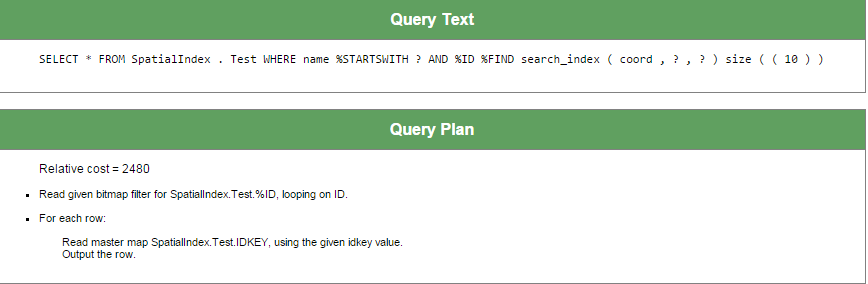
Here is the query plan:

SELECT *
FROM SpatialIndex.Test
WHERE name %startswith 'za'
and %ID %FIND search_index(coord,'radius','x=55,y=55,radiusX=2,radiusY=2') size ((10))

Since the coord index is likely to return few rows, the SQL engine does not use the index on the Name property.

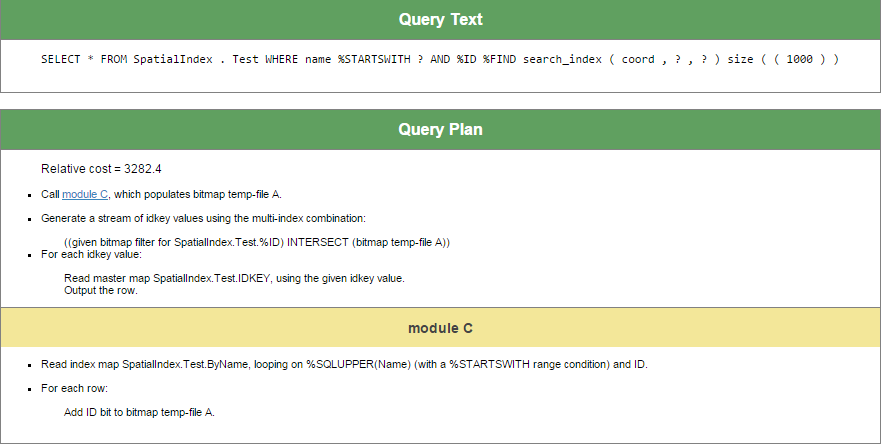
There is different plan for following query:

SELECT *
FROM SpatialIndex.Test
WHERE name %startswith 'za'
and %ID %FIND search_index(coord,'radius','x=55,y=55,radiusX=2,radiusY=2') size ((1000))

The SQL engine uses both indices to execute this query.

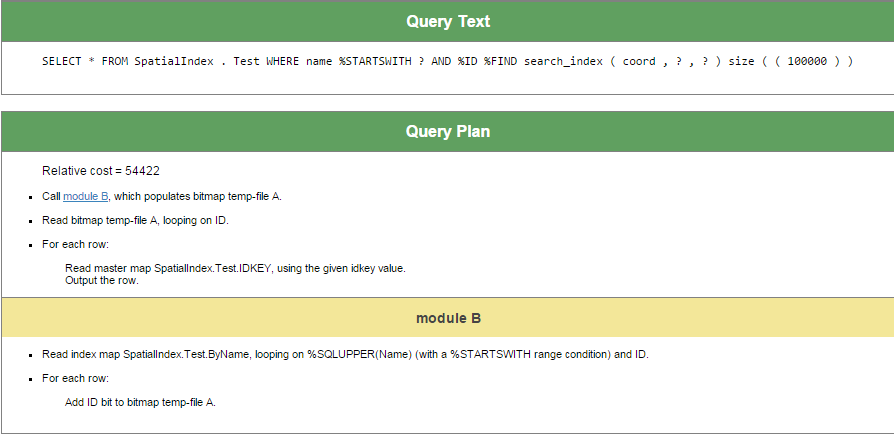
And, as the last example, let's create a request that only uses the index on the Name field, since the coord index will probably return about 100,000 rows and, therefore, will hardly be usable:

SELECT *
FROM SpatialIndex.Test
WHERE name %startswith 'za'
and %ID %FIND search_index(coord,'radius','x=55,y=55,radiusX=2,radiusY=2') size ((100000))

Thanks to everyone who have read or at least scrolled through this article.

Besides documentation links below, you may also find it useful to examine alternative implementations of the %Library.FunctionalIndex and %SQL.AbstractFind interfaces. To view these implementations, open either of these classes in Caché Studio and choose Class > Inherited Classes in the menu.

References:

1 Comment
讨论 (1)2
登录或注册以继续
文章
· 十二月 7, 2015 阅读大约需 1 分钟

Welcome everyone!.

I'm very proud of the Worldwide Response Center - an excellent group of men and women - and I am interested to hear from you about your experience using the WRC.  There are always better ways for us to serve you.   

I'm also very excited about the Developer Community which we're bringing to you to give you an opportunity to connect with groups and individuals in the InterSystems community.  Let us know what you think and how we can improve it in order to serve you better.

讨论 (0)1
登录或注册以继续
问题
· 十二月 2, 2015

Formatting the post

There is any mean to use different fonts? For example "Courier New" for code text, or different colors? To work only with HTML is too hard

1 Comment
讨论 (1)1
登录或注册以继续
请注意,此帖子已过时。
文章
· 十月 21, 2015 阅读大约需 1 分钟

High-Performance Encryption for Databases in Financial Services

Using Intel® Advanced Encryption Standard New Instructions with InterSystems Caché Substantially Improves Encryption Performance and Reduces Computational Overhead

Executive Summary

Financial services companies have an ever-growing need to encrypt databases containing sensitive customer and trade data. However, using encryption on these databases can require significant computational resources, potentially impacting trading latencies. Intel® Advanced Encryption Standard New Instructions (Intel® AES-NI), included in the Intel® Xeon® processor 5600 and E5 product families (and more recent Intel Xeon processor families), accelerates encryption and greatly reduces computational overhead.

Key Findings

Tests show that even as data and computational time increase, there is negligible degradation in performance for encryption or decryption. Use of Intel AES-NI with Caché’s interleaved cipher blocks can s

讨论 (0)0
登录或注册以继续
  • ‹‹
  • 当前 1000,最大 1000
  •